Agent Skills Explained: What They Are, How to Use Them, and How They Differ From MCP
A first-principles guide to Agent Skills: how they work, how to build one with skill-creator, and how they differ from MCP servers.
An Agent Skill is a folder containing a SKILL.md file, plus any scripts or reference files the job needs. It teaches an agent a procedure once so you stop re-explaining it every conversation. Anthropic shipped the format on 16 October 2025 and published it as an open standard, so Codex, OpenCode, and Cursor read it too.
A first-principles guide to Claude's Agent Skills: how they work, how to build one with skill-creator, and how they differ from MCP servers.
Estimated reading time: 9 minutes
Key Takeaways
- A skill is a folder, not a feature: An Agent Skill is a directory with a
SKILL.mdfile plus optional scripts and resources. It teaches Claude a procedure once, so you stop re-explaining it every conversation. - Progressive disclosure keeps it cheap: Claude loads only a skill's name and description at startup (~100 tokens each), reads the full instructions only when your request matches, and touches bundled files only if the task needs them.
- Write once, run everywhere: The same
SKILL.mdformat works across claude.ai, Claude Code, the Agent SDK, and the API. Because Anthropic published it as an open standard, tools like Codex, OpenCode, and Cursor read it too - skills aren't Claude-locked. - skill-creator builds skills for you: There's a skill whose only job is authoring skills. It interviews you about the workflow, scaffolds the folder, and writes a well-formed
SKILL.md. - Skills and MCP are not rivals: Skills are the recipe (what to do and how). MCP is the kitchen (live connections to tools and data). You use them together.
Table of Contents
- What an Agent Skill Actually Is
- How Skills Work: Progressive Disclosure
- Using Skills (and the Skill That Writes Skills)
- Skills vs MCP: The Recipe and the Kitchen
- Skills Aren't Locked to Claude
- Why This Changes How You Work With Claude
Have you ever explained the same thing to Claude for the fifth time? Your team's commit format. The way your company builds a PDF report. The exact steps to format a standup. You paste the same block of instructions into a fresh chat, again, because the model has no memory of the last four.
Here's the thing: that repetition isn't a model limitation. It's a packaging problem. The knowledge already exists in your head, it just has nowhere to live where Claude can pick it up on demand.
That's the gap Agent Skills fill. Anthropic shipped them on 16 October 2025, and the idea is refreshingly simple. A skill is a folder you hand to the agent, and it reads that folder only when the task calls for it. No fine-tuning, no plugin SDK, no re-explaining.
Let's break this down from first principles: what a skill actually is, how it works, how to use one (and generate your own), and why it's a different thing from an MCP server, not a competitor to it.
What an Agent Skill Actually Is
Forget the marketing framing for a second. Fundamentally, an Agent Skill is a directory on a filesystem. At its root sits one required file, SKILL.md, and that's the entire minimum viable skill.
Anthropic's own analogy is the best one: a skill is the onboarding guide you'd write for a new teammate - the instructions, reference material, and sometimes scripts they need to do a specific job the way your team does it.
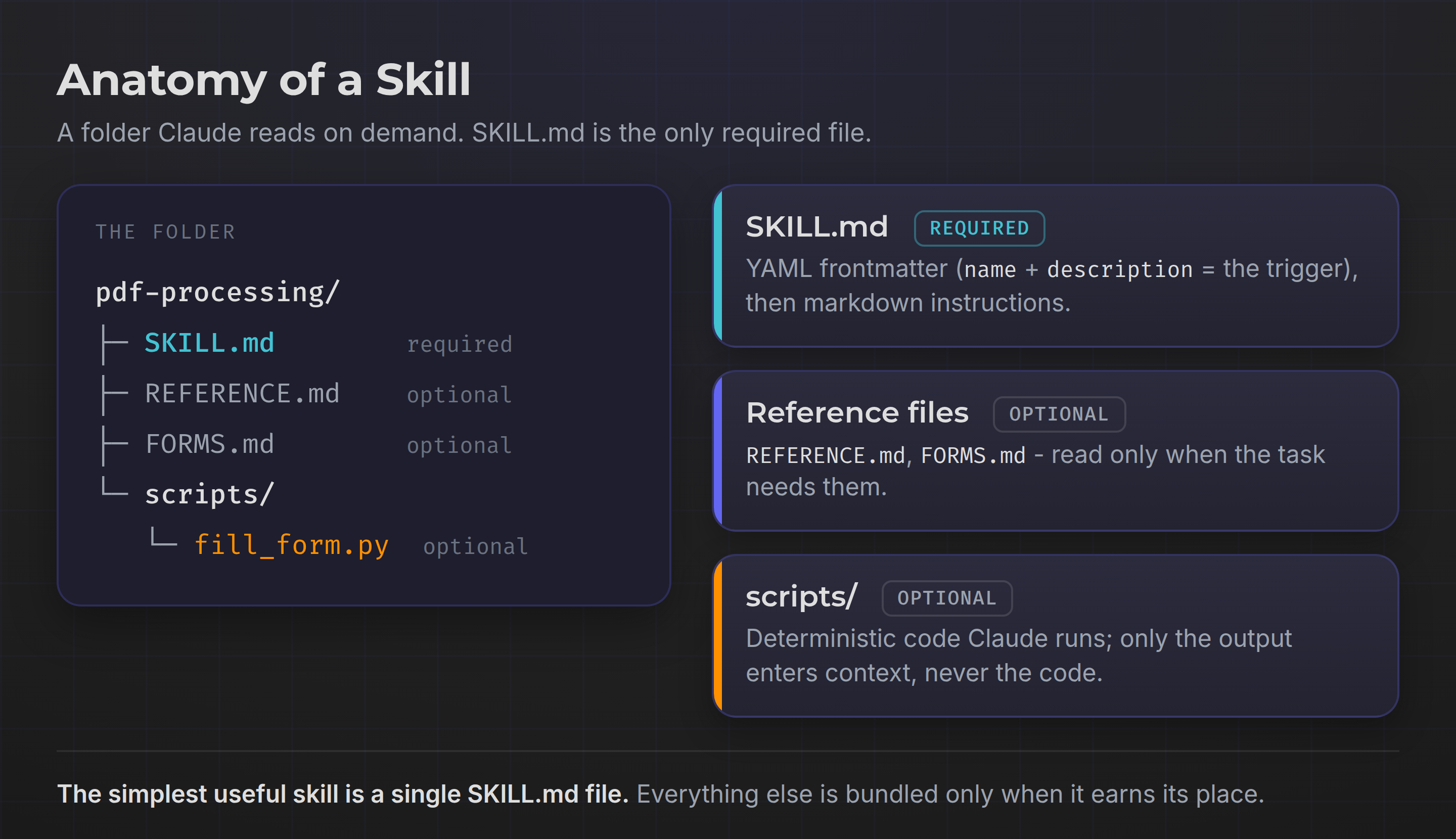
SKILL.md has two parts. First, a block of YAML frontmatter with two required fields: a name and a description. Second, the body, which is plain markdown telling Claude how to do the task.
---
name: pdf-processing
description: Extract text and tables from PDFs, fill forms, merge documents. Use when working with PDF files or forms.
---

# PDF Processing
## Quick start
Use pdfplumber to extract text...
That description field is doing more work than it looks. It's the trigger, the text Claude matches your request against to decide whether the skill is relevant. So it has to state both what the skill does and when to use it. Vague descriptions mean the skill never fires. (The rules are strict: name maxes out at 64 lowercase-and-hyphen characters, description at 1,024.)
Beyond SKILL.md, a skill can bundle whatever the job needs: extra markdown files (FORMS.md, REFERENCE.md), executable scripts (fill_form.py), or raw resources like schemas and templates. None of it is required - the simplest useful skill is a single file.
How Skills Work: Progressive Disclosure
Here's where it gets interesting. If you install twenty skills, you might expect twenty manuals crammed into Claude's context window before you've typed a word, a disaster for both cost and focus.
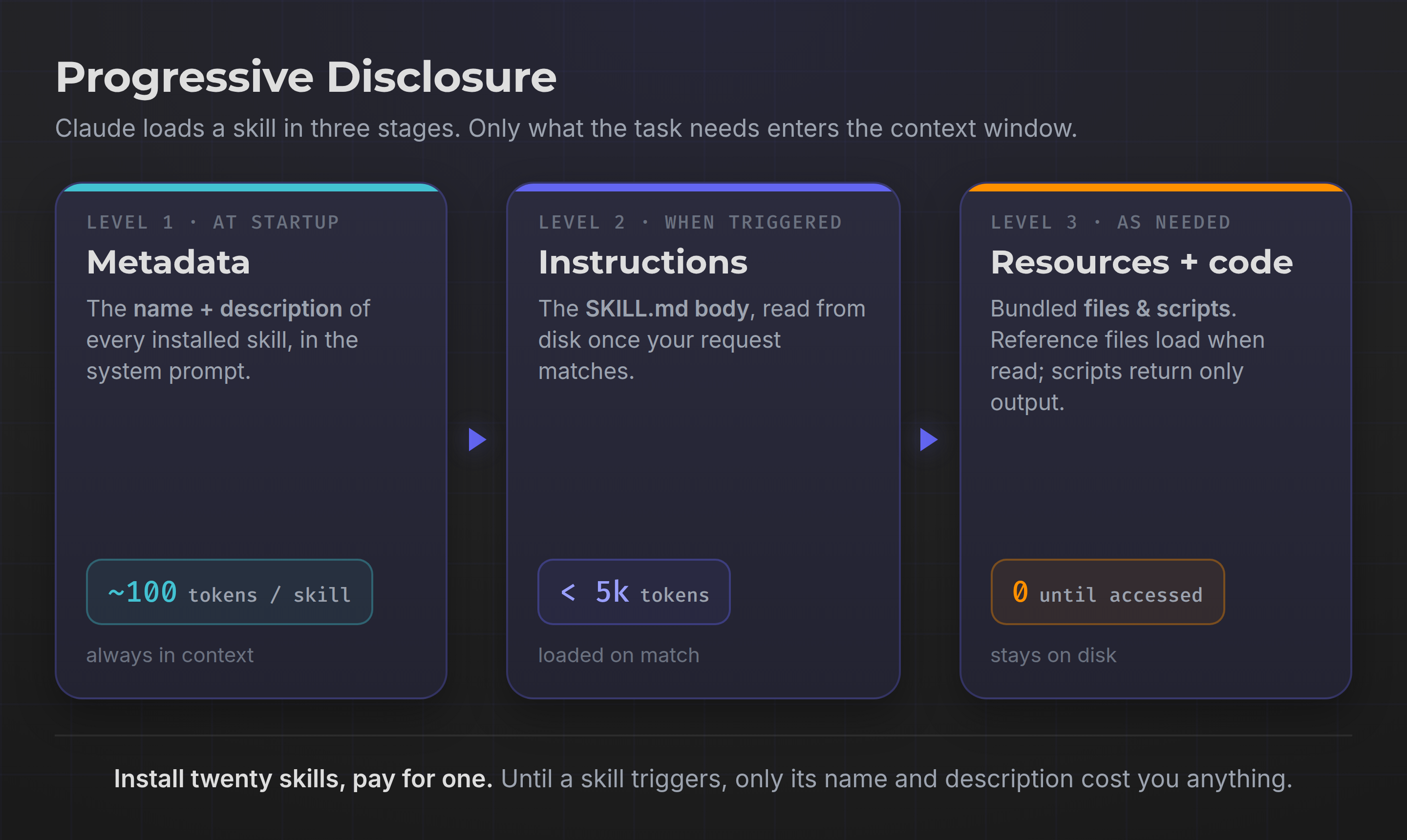
The fundamental issue skills solve is context economy, and the mechanism is called progressive disclosure. Claude loads information in three levels, each at a different moment.
1. Metadata (always loaded). At startup, Claude reads only the name and description of every installed skill, roughly 100 tokens each, into its system prompt. That's it. Twenty skills cost you a couple thousand tokens total, and Claude now knows what's available without knowing the details.
2. Instructions (loaded when triggered). When your request matches a skill's description, Claude runs a bash command to read the full SKILL.md body from disk. Only now do the actual instructions, kept under about 5k tokens, enter the context window.
3. Resources and code (loaded as needed). Bundled files cost zero tokens until Claude actually opens them. Need the sales schema but not the forms guide? Claude reads only the schema. A skill can ship dozens of reference files with no context penalty for the ones a given task never touches.
The script handling is the part I like most. When a skill includes validate_form.py, Claude runs it through bash and gets back only the output ("Validation passed" or an error), never the code itself. Because code is deterministic, that step is consistent and repeatable, and far cheaper than asking the model to regenerate equivalent logic on the fly. In real-world systems, that gap between "reason about it" and "just run the script" is often the gap between reliable and flaky.
Using Skills (and the Skill That Writes Skills)
From a practical standpoint, using a skill comes down to two things: put it where Claude can find it, and let the description do the triggering. You don't invoke a skill by name. Claude picks it up automatically when your request matches.
Where a skill lives depends on the surface:
- Claude Code: drop the folder in
~/.claude/skills/(personal) or.claude/skills/(project). It's pure filesystem, no upload. - claude.ai: upload a zip through Settings > Features (Pro, Max, Team, and Enterprise plans, with code execution on). Skills here are per-user.
- The API / Agent SDK: upload through the
/v1/skillsendpoints and reference theskill_id, running inside the code execution tool.
One honest caveat: skills don't sync across surfaces - upload one to claude.ai and it isn't automatically on the API. Same format, separate installs. Out of the box, Anthropic ships four pre-built document skills (PowerPoint, Excel, Word, PDF), plus partner skills from Canva, Notion, Figma, and Atlassian.
Let skill-creator do the scaffolding
Now, writing a SKILL.md by hand is easy to get subtly wrong: a weak description that never triggers, a bloated body, files that go unreferenced. So Anthropic built a skill whose entire job is building other skills: skill-creator.
Ask for it, and it interviews you about the workflow, generates the correct folder structure, writes a well-formed SKILL.md with a trigger-optimized description, and bundles the resources you point it at. It's the fastest way to turn a repeatable process you keep narrating into something Claude just knows. Meta, but genuinely useful.
Skills vs MCP: The Recipe and the Kitchen
This is the question I get most, so let's kill the confusion directly: Agent Skills and MCP are not competitors. They operate at different layers, and the sharpest mental model I've seen is this: skills are the recipe, MCP is the kitchen.
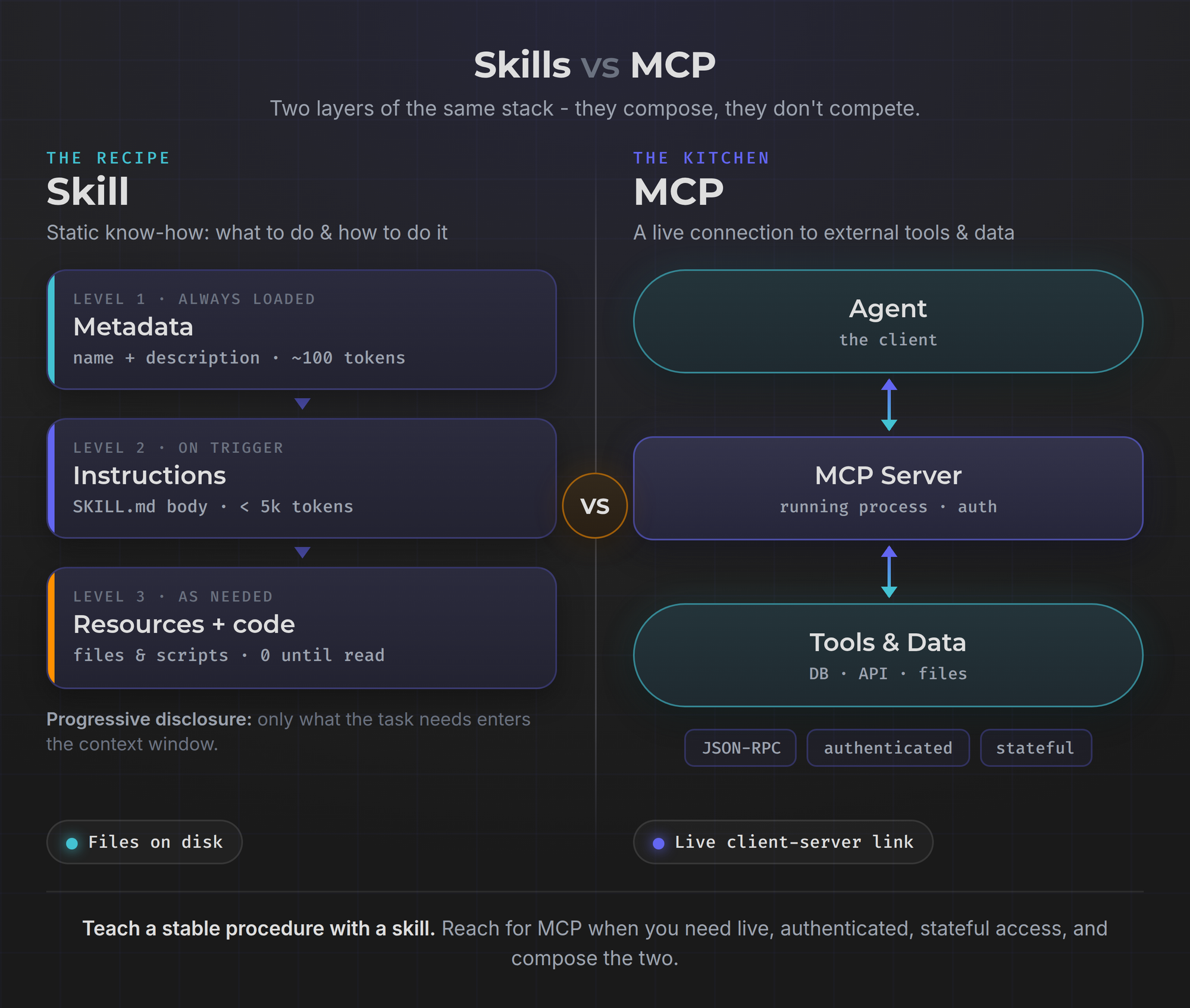
A skill is static procedural knowledge. It's markdown and files sitting on a disk. It tells the agent what to do and how to do it, your conventions, your workflow, your steps. It runs nothing on its own.
MCP (Model Context Protocol) is a live connection. It's a client-server protocol, built on JSON-RPC, that plugs an agent into external tools and data through a running process with its own authentication and persistent state. It gives the agent the infrastructure to actually do things: query the database, hit the API, read the ticket.
The distinction that makes it click: does the thing change between calls? A live Salesforce connection, a database with fresh rows, an authenticated session, that's MCP. A workflow that stays stable for weeks, that's a skill.
There's a cost angle too. Loading 50 MCP tools with full schemas can eat around 8,000 tokens before you start; a skill teaching the same patterns might cost 400. That's not an argument against MCP, it's an argument for right-sizing: use MCP for a live, authenticated, stateful connection, and a skill to teach a stable procedure. Better still, compose them - a skill can teach the agent how to use the very tools an MCP server exposes, which is exactly where Anthropic's own guidance points.
Skills Aren't Locked to Claude
Here's a detail that gets missed: the format isn't proprietary. Anthropic published SKILL.md as an open standard, and the ecosystem adopted it fast. The same skill file now works unmodified across Claude Code, OpenAI's Codex, OpenCode, Cursor, and Gemini CLI - more than twenty agents read it. Write a skill once and it travels with you, whatever tool or model you're driving. Your know-how stops being locked to one vendor.
That portability also means a growing marketplace of community skills. Directories like SkillHub catalog thousands of ready-made skills you can drop in within seconds - a genuinely useful place to see what a good SKILL.md looks like.
But here's the critical caveat, and I won't soften it: installing a skill is executing trust. A skill can run code and invoke tools on your machine, so a bad one is a security problem, not a bad download. Malicious and low-quality skills exist. Before you install anything from a directory, open the SKILL.md and every bundled script and read them, exactly as you'd vet someone else's software before running it.
From a practical standpoint, the safest path - and the one I default to - is to build the skill yourself with skill-creator. You get exactly the behavior you want, and there's nothing to audit because you wrote it. Browse the marketplaces for ideas; write the ones you'll actually rely on.
Frequently Asked Questions
Are Agent Skills free to use?
The format itself is free and open. Creating skills in Claude Code costs nothing beyond your normal usage. On claude.ai, custom skills need a paid plan (Pro, Max, Team, or Enterprise) with code execution enabled, and via the API you pay for the underlying code execution and tokens as usual.
Do I need to know how to code to build a skill?
No. A skill can be pure markdown, instructions in plain English. Scripts are optional, for the parts where deterministic code beats asking the model to improvise. And skill-creator will scaffold the whole thing for you through a conversation.
Where does my data go when a skill runs?
It depends on the surface. On the API, skills execute in a sandboxed container with no network access, so they can't call out to the internet on their own. In Claude Code they run with the same network access as any program on your machine, which is more capable and worth respecting. One thing to note: Agent Skills aren't covered by zero-data-retention arrangements, so execution data follows Anthropic's standard retention policy.
How is a skill different from just a good prompt?
A prompt is conversation-level. It lives and dies with one chat. A skill is reusable and loads on demand across every conversation, without you pasting anything. And thanks to progressive disclosure, you can keep many skills installed with almost no standing context cost.
Why This Changes How You Work With Claude
Step back and the bigger picture comes into focus. For a while, making an AI genuinely useful for your work meant either fine-tuning a model or wiring up bespoke integrations. Skills collapse that into something anyone can do: write down how you work, in a folder, once.
That's a quiet but real shift. The value moves from the model's raw capability toward the procedural knowledge you package around it - your commit conventions, your report format, your security-review steps, the stuff that makes the work yours. That surrounding layer has a name - the harness - and a skill is one component of it. I mapped the whole thing out (what it is, when you need one, and how to build yours) in Agent Harness Explained.
Ask yourself what you re-explain to Claude every week. That's your first skill. Run skill-creator on it, and watch Claude pick it up on its own next time. Then reach for MCP when you need live tools underneath it. Build the recipe first; the kitchen comes when the cooking gets real.
P.S. If you want to go straight to the source, read Anthropic's engineering deep-dive on Agent Skills and browse the open-source examples in the anthropics/skills repository.
Don't miss out on future posts and exclusive content—subscribe to my free newsletter today.
Ready to connect or explore more? Head over to my LinkedIn profile