Agent Harness Explained: What It Is, When to Use One, and How to Build Your Own
A first-principles guide to the AI agent harness: the layer around the model that decides whether your agent actually works.
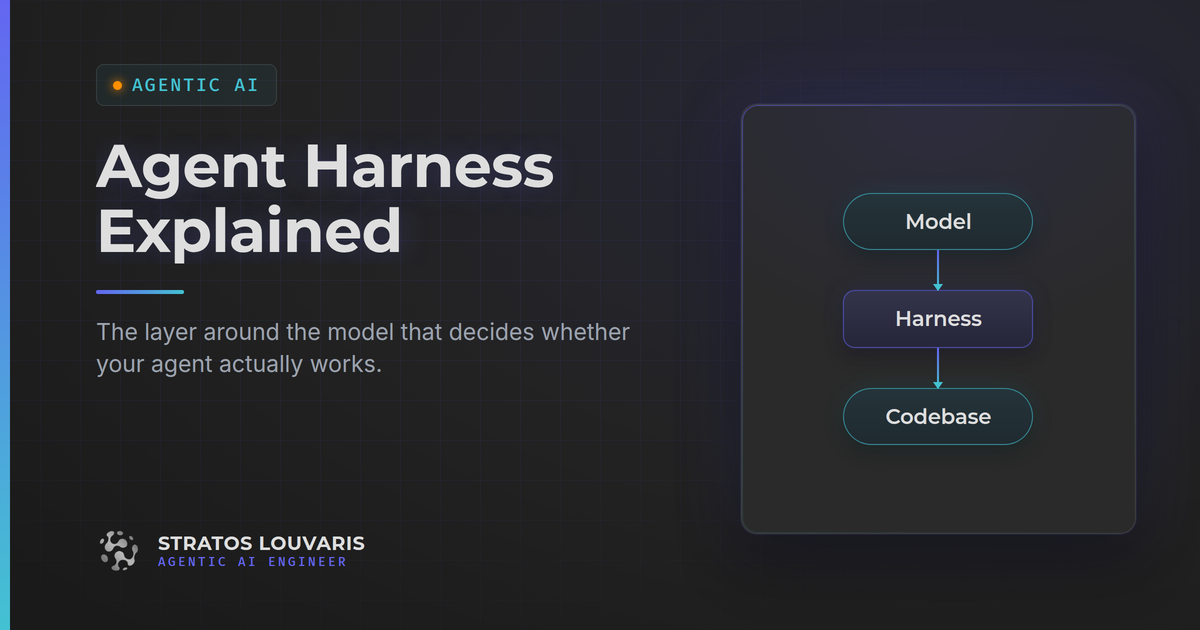
An agent harness is everything wrapped around the model: the loop that feeds it context, runs its tools, checks its work, and stops it doing damage. Agent equals model plus harness. If you use Claude Code, Cursor, or Codex, one is already running, and the outer layer, the part you configure, is the part you own.
A first-principles guide to the AI agent harness: the layer around the model that decides whether your agent actually works.
Key Takeaways
- Agent = Model + Harness: The model only turns text into text. The harness is everything else - the loop that feeds it context, runs its tools, checks its work, and stops it doing damage.
- You already have one: If you use Claude Code, Cursor, or Codex, a harness is already running. The open question is whether you have tuned the outer layer, which is the part you own.
- Supervision decides how much you need: Watching every diff? It barely matters. Running an agent unattended? The harness is the only thing between it and your production database.
- Build it from guides and sensors: Guides steer before the agent acts (
AGENTS.md, skills, templates). Sensors catch it after (linters, types, tests). Then close the loop so the agent runs the sensors itself. - The rule that makes it work: Every time the agent makes a mistake, fix the environment so that mistake becomes structurally impossible. Not the prompt. The environment.
Table of Contents
- What an Agent Harness Actually Is
- When You Actually Need a Harness
- How to Build Your Outer Harness: Guides and Sensors
- The Harnesses Worth Knowing in 2026
- Stop Tuning the Model, Start Tuning the Loop
You swapped in the newer, smarter model. You paid more per token for it. And the agent failed the same way it failed last week - edited the wrong file, skipped the test suite, confidently reported "done" on something that does not compile.
Sound familiar?
Here's the thing: we keep tuning the one variable we don't control. We rewrite prompts, we upgrade models, we argue about which frontier release is smartest. Meanwhile the thing that actually decided the outcome was the handful of config that determined what the agent could see, what it could touch, and whether anything checked its work before it declared victory.
That layer has a name now. It's the harness, and in 2026 it went from an unnamed implementation detail to the thing serious teams spend their engineering hours on.
Let's break this down from first principles: what a harness is, when to invest in one, how to build your own, and which harnesses are worth your attention right now.
What an Agent Harness Actually Is
Start with what the model can do, because it's less than people assume.
A large language model takes text in and produces text out. That's it. It's stateless - it remembers nothing between calls, and it cannot read a file, run a test, or check whether the code it just wrote compiles. Every impressive thing you have watched an "AI agent" do, the model did not do. Something else did it, on the model's behalf, in a loop.
That something else is the harness. The definition that has settled across the industry this year is refreshingly blunt: a harness is everything in an AI agent except the model itself.
Or, as an equation you can hold in your head: Agent = Model + Harness
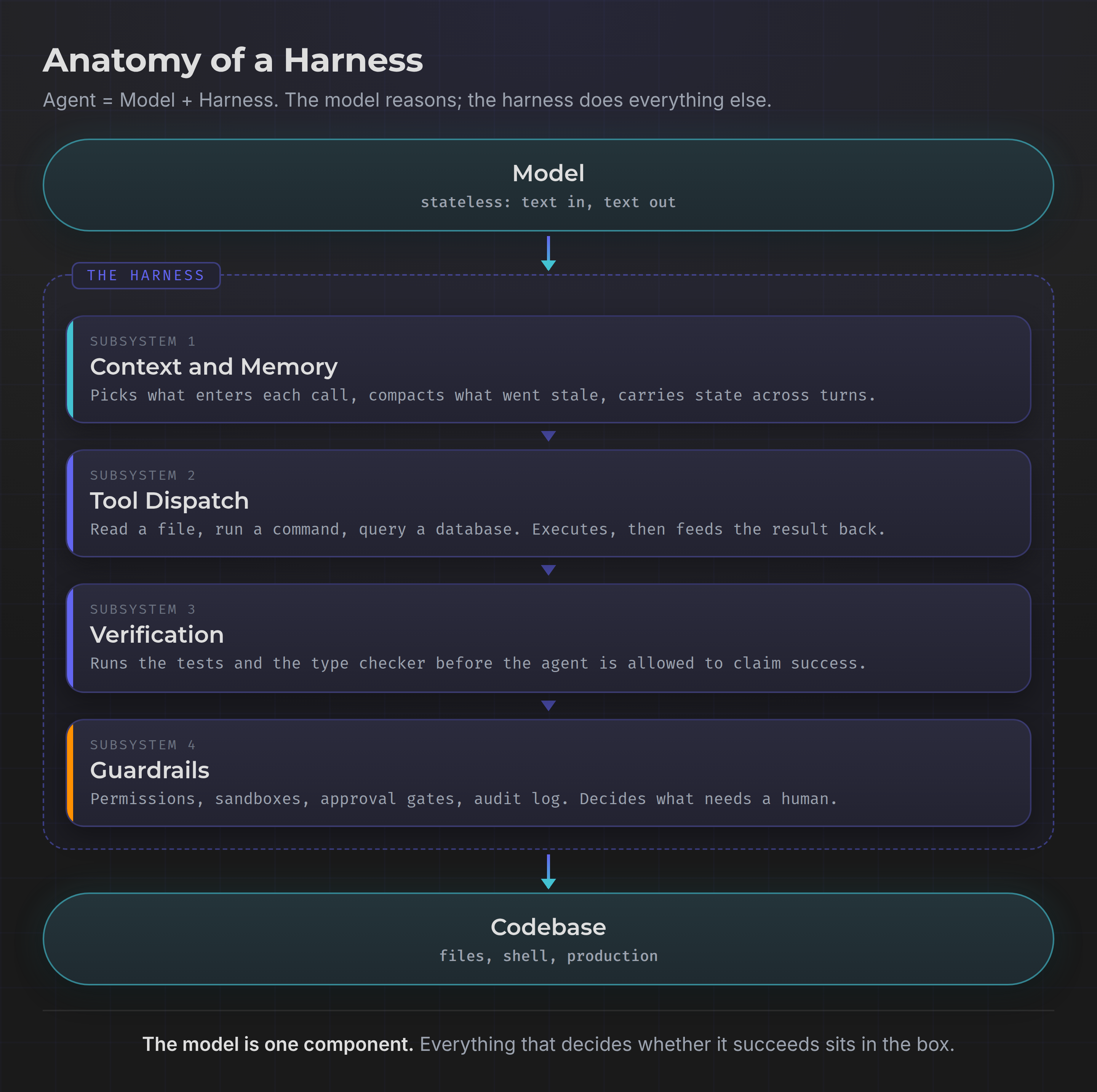
Open it up and you find four subsystems doing real work:
1. Context and memory. Deciding what goes into each model call. Your context window is finite, expensive, and still degrades on information buried in the middle.
2. Tool dispatch. Defining what the agent can call - read a file, run a command, query a database - then executing the request and feeding the result back.
3. Verification. Checking the work before the agent claims success. Running the tests. Running the type checker.
4. Guardrails. Permissions, sandboxes, approval gates, audit logs. The part that decides an action is too consequential to take without a human saying yes.
There's a useful split inside this. The inner harness is what the vendor ships - Claude Code's system prompt, its search strategy, its tool set. You don't control it. The outer harness is what you assemble around it: your AGENTS.md, your test command, your permission rules. That's the part you own, and where nearly all your leverage lives.
The vocabulary is recent. Mitchell Hashimoto, the HashiCorp co-founder, published a post on 5 February 2026 with a definition so plain it's easy to underrate: anytime you find an agent makes a mistake, you take the time to engineer a solution such that the agent never makes that mistake again. Within weeks, OpenAI and Anthropic had published their own engineering write-ups, and harness engineering had a name.
When You Actually Need a Harness
Let's kill the obvious objection first: you don't get to opt out. If you use an agent, a harness is already running. The real question is how much of the outer one you should build.
Ask yourself one question, because it decides everything: how closely am I watching?
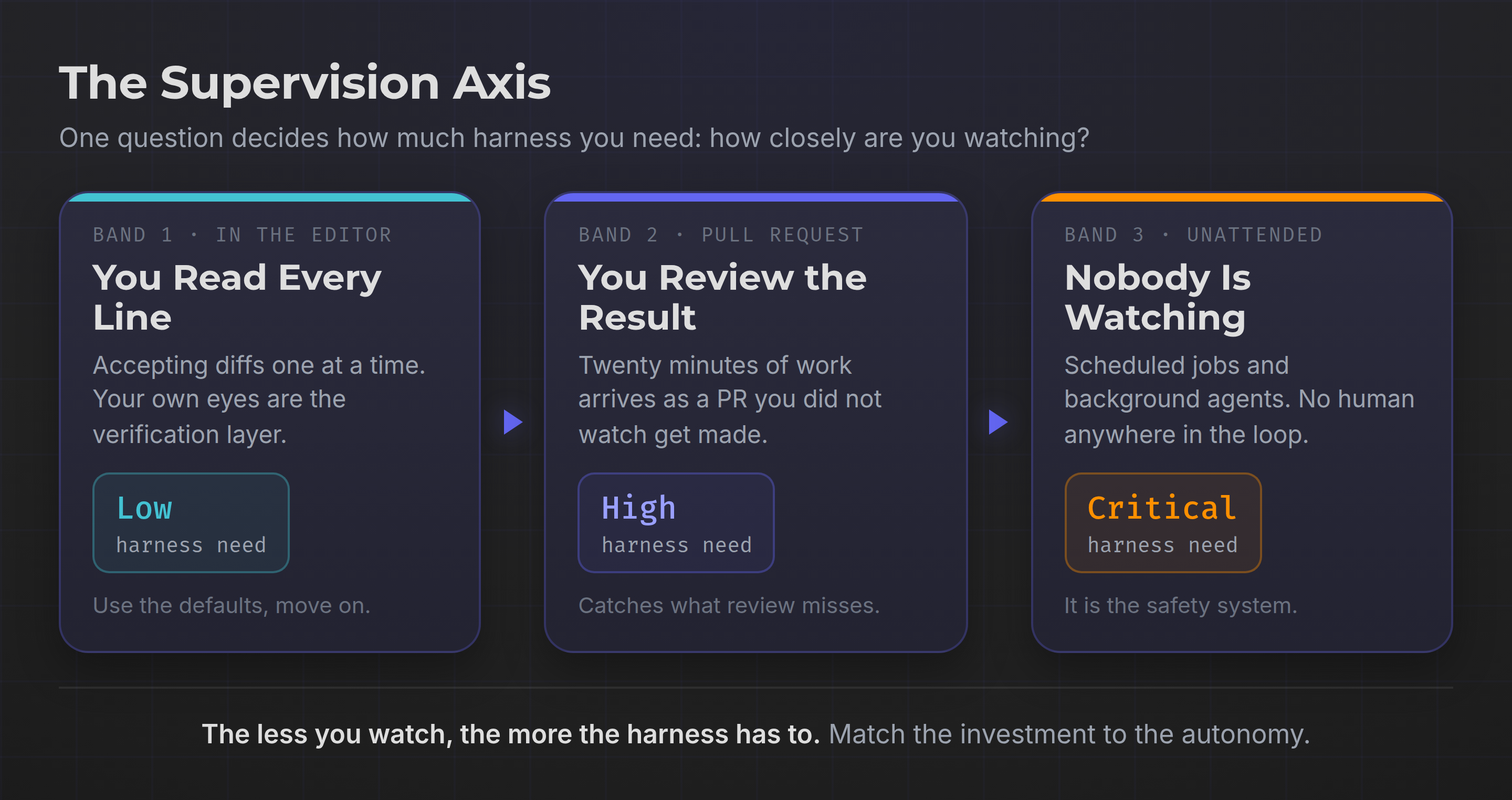
Band 1 - You read every line. You're in the editor accepting diffs one at a time. Your eyes are the verification layer. A harness barely pays for itself here. Use the defaults and get on with your work.
Band 2 - You review the finished result. The agent works for twenty minutes and hands you a pull request. Now you're reviewing an artifact you didn't watch get made, and review is expensive and error-prone. This is where a harness starts earning real money: every mistake it catches automatically is one you don't have to catch by reading.
Band 3 - Nobody is watching. Scheduled jobs, background agents, anything unattended. Here the harness isn't a productivity tool, it's the entire safety system - the only thing standing between an autonomous process and your production database.
There's a simpler trigger too: the second time you see the same mistake. Once is noise. Twice is a pattern, and a pattern is a harness gap. That's the moment to stop correcting the agent in chat and go fix the environment.
And the honest trade-off, because there always is one: harness work is real engineering time and it doesn't feel like shipping. For a one-off script, skip it. For a codebase you'll live in for the next year, it compounds harder than almost anything else you could do with those hours.
How to Build Your Outer Harness: Guides and Sensors
The most useful mental model comes from Thoughtworks, in Martin Fowler's write-up on harness engineering, and it borrows straight from control theory. Every harness component is either a guide or a sensor.
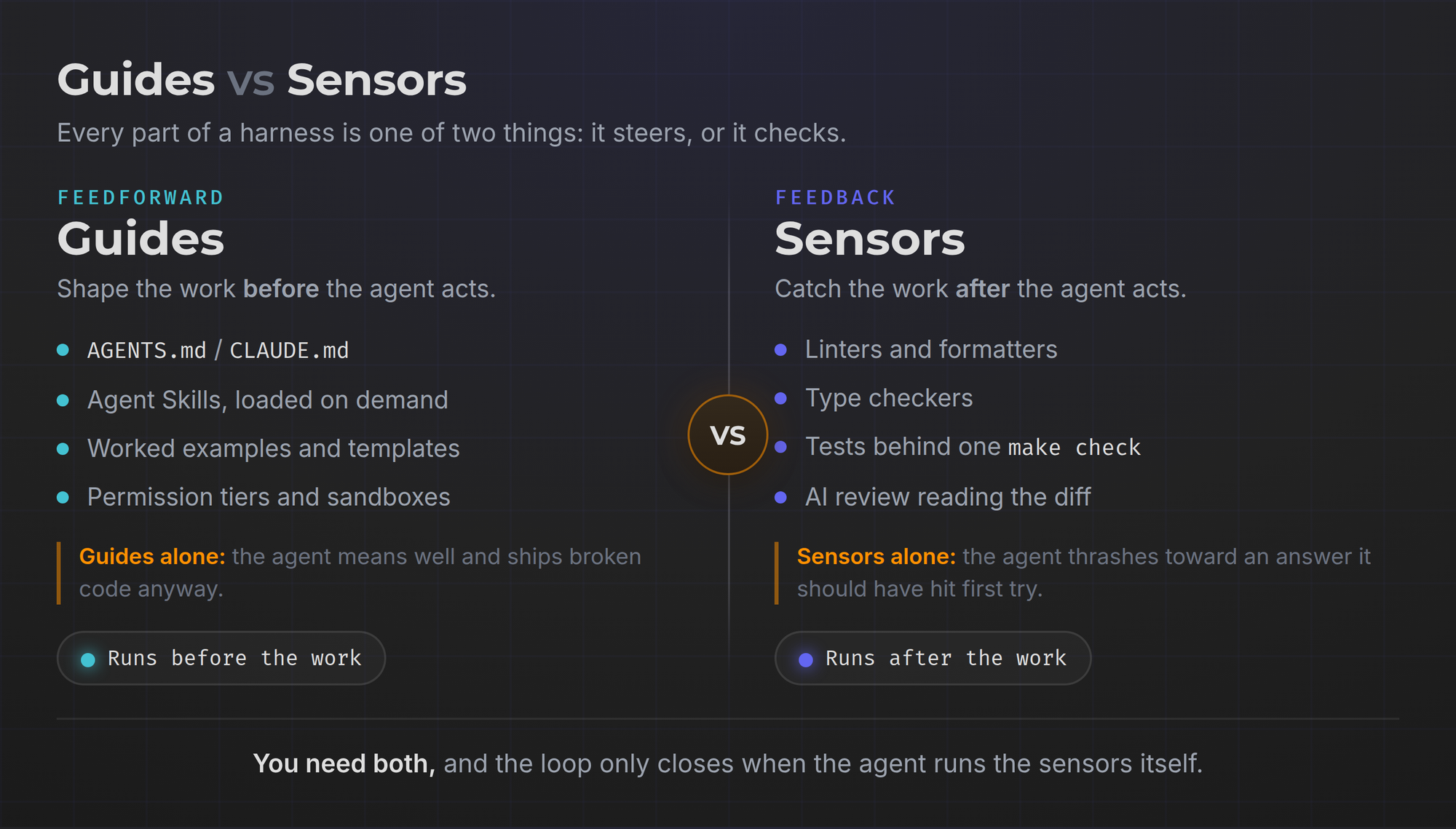
Guides are feedforward. They shape behaviour before the agent acts: project conventions, worked examples, templates, the file that says "we use pytest, never unittest."
Sensors are feedback. They observe after the agent acts and let it self-correct: linters, type checkers, tests, an AI reviewer reading the diff.
You need both. Guides alone produce an agent that means well and ships broken code anyway. Sensors alone produce an agent that thrashes its way to a solution it should have reached first try.
Here's the build order:
1. Write the guides first, because they're free. One AGENTS.md or CLAUDE.md at the repo root holding the facts true on every turn: build command, test command, directory layout, the two conventions people always get wrong. Keep it short - it loads on every call, so every line costs you. For procedures that only matter sometimes, use Agent Skills instead, which load on demand rather than always.
2. Make your sensors fast and one command deep. An agent won't run a seven-step verification ritual. It will run make check. Collapse lint, types, and tests behind a single command that exits non-zero on failure. A ninety-second check the agent actually runs beats a twelve-minute suite it skips. What those checks should measure for an agent rather than a single function is a harder question than it looks, and I worked through it in a separate piece on evaluating agents.
3. Close the loop. This is the step people miss. Don't just have sensors - tell the agent in the guides that it must run them and fix what they report before declaring the work done. A sensor the agent never reads is just a slower version of you catching the bug in review.
4. Draw the blast radius, then sandbox it. Sort actions by consequence: reads are safe, writes need care, anything touching production or spending money needs a human. Enforce that in the harness, not in the prompt. When I built the action gate for my own assistant, the rules that mattered were the boring ones - deny by default, an explicit allowlist rather than a blocklist, and an unknown action classified sensitive rather than safe. Fail closed. Then give the agent a real boundary to work inside: a container, a scratch git worktree, a scoped token. Model-generated shell commands are untrusted input running on your machine, and a plausible-looking wrong command executes exactly as fast as a right one.
5. Then apply Hashimoto's rule forever. Every failure earns a permanent environmental fix: a lint rule, a test, a line in the guides, a tighter permission. Log the failures, not the successes, and watch whether the same category shows up twice.
That last point is the real payoff. Prompt fixes evaporate the moment you switch models. Harness fixes don't.
The Harnesses Worth Knowing in 2026
One thing worth noting up front: most of these are now model-agnostic. They compete on harness quality, not on which model they wrap.
Terminal-first
- Claude Code - Anthropic's agent for terminal, IDE, and browser. The deepest customization surface: skills, subagents, hooks, permission tiers.
- OpenAI Codex - written in Rust and, as of August 2026, open source under Apache-2.0. If you want to read a production harness rather than theorize about one, this is now the best source available.
- Gemini CLI - Google's open-source terminal agent, with a generous free tier.
- OpenCode - open source and deliberately provider-neutral. Good if you want to swap models without changing your workflow.
- Aider - the veteran. Git-native and unusually transparent about what it puts in the context window.
- Goose - Block's open-source agent, built around MCP for extensibility.
Editor-embedded
- Cursor - still the most widely adopted, and strongest at Band 1 work where you review as you go.
- Cline - open source, bring-your-own-key, with an approval step on every action. Its permission model is genuinely instructive.
Autonomous and self-hosted
- OpenHands - the leading open-source autonomous platform, sandboxed by default and self-hostable, which matters when your code cannot leave your infrastructure.
Orchestration on top of a harness
- Archon - a different animal from the rest of this list: it does not replace your harness, it drives one. You define the process (plan, implement, review, open the PR) as YAML workflows with human approval gates, and it runs them in isolated git worktrees so several can go at once without colliding. Its own description calls it "the first open-source harness builder," which is fair - it is essentially the five steps above, versioned and made repeatable. MIT, and the tool I reach for on larger changes to my own assistant's codebase.
Building your own
- Claude Agent SDK - Claude Code's harness minus the CLI, exposed as a library. The fastest route to a custom agent that isn't a chat window.
The useful exercise isn't picking a winner. It's noticing that these tools increasingly run the same models and produce very different results, which tells you exactly where the difference comes from.
Frequently Asked Questions
Is a harness the same thing as an agent framework like LangGraph?
They overlap, but no. A framework gives you primitives for building agent logic - graphs, state, tool abstractions. A harness is the complete running system, including what a framework leaves to you: sandboxing, permissions, verification, context compaction. You can build a harness with a framework, but installing one doesn't give you a harness.
Do I need to build a harness if I already use Claude Code or Cursor?
You need to build the outer one. The inner harness ships with the tool and you can't change it. The guides, the one-command verification, and the permission rules are yours, and that's where the quality difference shows up. A tuned outer harness on a mid-tier model regularly beats an untuned setup on the best model available.
Is it safe to let a harness run commands on my machine?
Not by default. Treat model-generated commands as untrusted input, because that's exactly what they are. Run the agent in a container or an isolated git worktree, use deny-by-default permissions with an explicit allowlist, scope any credentials to the minimum, and require human approval for anything irreversible.
Does a better harness let me use a cheaper model?
Often, yes, and it's one of the most practical returns on harness work. A lot of what looks like a reasoning failure is really a context failure or a missing feedback loop. Give a cheaper model clean context and a fast test command it must pass, and the gap narrows a long way - though genuinely hard architectural reasoning still wants the strong model.
Isn't this just prompt engineering with a new name?
No, and the difference is durability. A prompt fix lives in one conversation and dies when you switch models. A harness fix - a lint rule, a test, a permission tier - is code. It survives model upgrades, it applies to every agent that touches the repo, and it works for your teammates too.
Stop Tuning the Model, Start Tuning the Loop
Here's what the harness conversation is really about, underneath the new vocabulary.
For two years the industry treated agent quality as a model problem, because that's the variable vendors control and benchmarks measure. But most of us aren't training models. We're assembling systems around them. And in any system, reliability comes from the feedback loops, not the raw capability of a single component. That's true of distributed systems, it's true of CI pipelines, and it turns out it's true here.
The shift is that the harness is the part you own. Your model choice is a one-line change anyone can copy. Your harness - the accumulated guides, sensors, permissions, and hard-won fixes for mistakes you have actually seen - is not. It's the compounding asset, and it's why two engineers with identical tools get results that aren't remotely comparable.
So start small and start today. Open the repo you work in most, write down the three things you have corrected the agent about more than once, put them in an AGENTS.md, and collapse your checks into one command the agent is told to run. That's a harness. Twenty minutes, and it pays you back every session from here on.
The model is the horse. You're supposed to be holding the reins.
P.S. If you want to read a real production harness instead of reading about one, OpenAI open-sourced theirs under Apache-2.0 in August: github.com/openai/codex
Don't miss out on future posts and exclusive content—subscribe to my free newsletter today.
Ready to connect or explore more? Head over to my LinkedIn profile