RAG Embeddings, Vector Databases & Chunking — Part 2
Embeddings, vector databases, and chunking are the foundation of every RAG system. Compare 6 vector DBs and 7 chunking strategies for your stack.
Estimated reading time: 8 minutes
Key Takeaways
- Embeddings turn text into searchable meaning: They convert words into numerical vectors where similar concepts land close together — enabling search by meaning, not just keywords.
- Your vector database choice is an infrastructure decision: From pgvector (simplest) to Milvus (most scalable), each option carries trade-offs in complexity, cost, and control. Start with what you already have.
- Chunking is the most underestimated decision in RAG: How you split documents directly determines what gets retrieved. Seven strategies exist, ranging from naive fixed-size splitting to LLM-powered agentic chunking.
- This is Part 2 of a 3-part series: Part 1 covered what RAG is and how the pipeline works. This article dives into the three foundational pillars. Part 3 covers 11 advanced RAG strategies for production.
Table of Contents
- Embeddings: Turning Words Into Numbers That Understand Meaning
- Vector Databases: Where Your Knowledge Lives
- Chunking Strategies: How You Split Documents Changes Everything
- Frequently Asked Questions
- The Foundation Is Set — Now Let's Build on It
In Part 1, I walked through what RAG is and how the pipeline works, ingestion, retrieval, generation. The structure is straightforward. But here's the thing: the quality of your RAG system depends almost entirely on three decisions you make before a single query ever runs.
How do you represent meaning numerically? Where do you store and search those representations? And how do you break your documents into pieces that are actually useful?
These three questions map to three building blocks: embeddings, vector databases, and chunking. Get any one of them wrong, and your retrieval fails, which means your LLM generates answers from irrelevant context, which is arguably worse than no context at all.
Let's break each one down.
RAG Embeddings: Turning Words Into Numbers That Understand Meaning
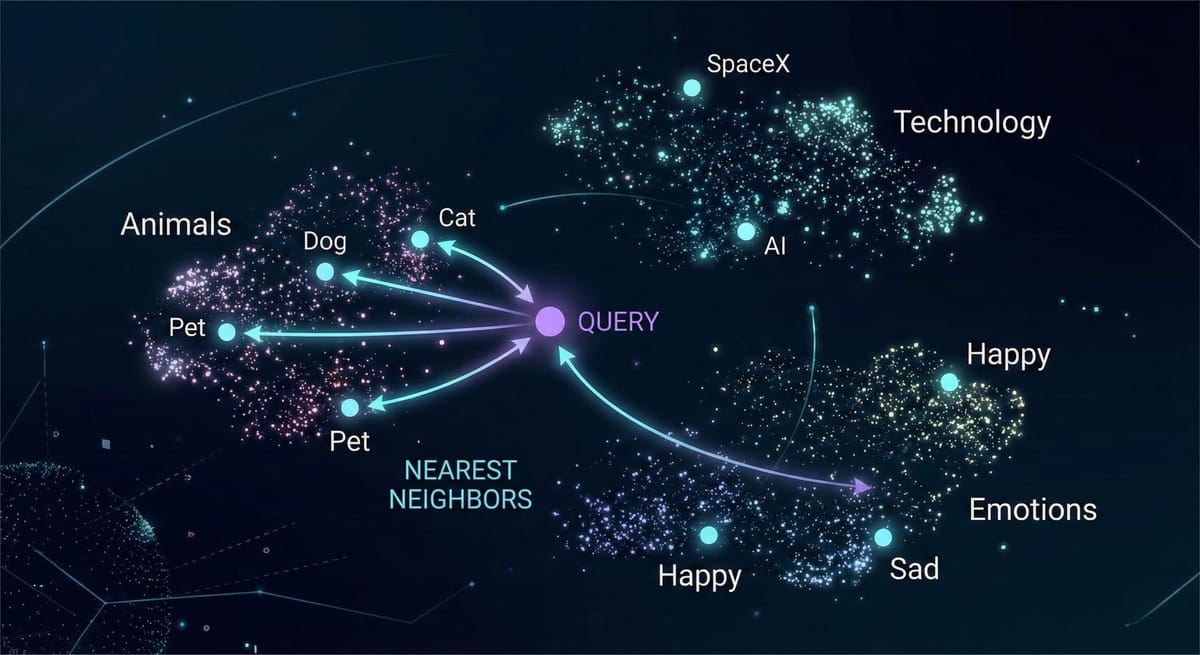
An embedding is a numerical representation of text, a list of numbers (a vector) that captures semantic meaning. When you embed "The cat sat on the mat," you get something like 1,536 floating-point numbers. That list is the meaning of that sentence, encoded in a format computers can compare mathematically.
Here's the key insight: texts with similar meanings produce similar vectors, even when the words are completely different. "The feline rested on the rug" and "The cat sat on the mat" produce vectors that are close together. "Stock prices fell sharply on Tuesday" produces a vector far away from both. This is what makes semantic search possible, you're matching meaning, not keywords.
Think of it like a librarian who organizes books by topic and content, not alphabetically. Books about cooking end up near each other regardless of their titles. An embedding model does this automatically, but in a space with hundreds or thousands of dimensions.
Dimensionality and Similarity
A 384-dimensional model (like all-MiniLM-L6-v2) captures the gist. A 1,536-dimensional model (like OpenAI's text-embedding-3-small) captures finer distinctions. More dimensions means more nuance, but also more storage and slower search. For many applications, 384 or 768 dimensions are sufficient, don't default to the biggest model.
For comparing vectors, cosine similarity is the standard. It measures the angle between two vectors — identical direction scores 1, opposite scores -1, unrelated scores 0. Dot product and Euclidean distance are alternatives, but cosine similarity is where you start.
Choosing a Model
OpenAI text-embedding-3-small (1,536 dims) is the most common commercial option — strong across domains, reasonably priced. Sentence-Transformers all-MiniLM-L6-v2 (384 dims) is the go-to open-source option, free, fast, runs locally, and keeps your data on your infrastructure. Cohere Embed is worth considering for multilingual documents.
One critical rule: use the same embedding model for ingestion and queries. Different models produce vectors in different spaces. Comparing vectors from different models is like comparing distances measured in miles and kilometers without converting — the numbers are meaningless together.
Vector Databases: Where Your Knowledge Lives
Once your chunks are embedded, you need somewhere to store those vectors and critically, search them fast. Vector databases are built for one specific operation: given a query vector, find the most similar stored vectors.
A traditional database has no native concept of "find the most similar row." You'd have to compare against every vector, which doesn't scale. Vector databases use specialized indexing (like HNSW graphs) that make approximate nearest-neighbor search fast enough for real-time applications, even with millions of vectors.
Here's an honest look at the major options.
PostgreSQL + pgvector is the lowest-friction path if you're already on Postgres. You get vector search alongside your existing relational data, transactions, backups, access control, joins. It handles millions of vectors comfortably. Performance caps out below dedicated solutions at very high scale, but for most RAG systems, it's more than enough. This is where I'd recommend most teams start.
Pinecone is fully managed, zero operational burden. You send vectors and query them. The trade-off is vendor lock-in and cost escalation at scale. Your data lives on their infrastructure. Best for teams that prioritize speed of development over control.
Weaviate is open-source with hybrid search (vector + keyword) built in. That's a significant practical advantage. Steeper learning curve and more resource-heavy, but the module ecosystem is rich. Self-host or use their cloud.
Chroma is the lightweight, Python-native option — perfect for development and small applications. Not built for large-scale production, but gets you running in minutes.
If you're running a local RAG stack with Ollama, Chroma pairs naturally with that setup — see my Ollama self-hosting guide for the full stack.
Milvus is designed for massive scale — billions of vectors, GPU-accelerated search. Complex to operate. Overkill for anything that isn't genuinely large-scale.
Qdrant is written in Rust for performance, with rich filtering capabilities. Strong developer experience. Newer but gaining adoption fast. Good choice for teams that want to self-host and value speed.
Security Considerations for Your Vector Store
Vector databases hold embedded representations of your actual data.Before picking one, think about the attack surface.
For multi-tenant systems, namespace isolation is non-negotiable, Pinecone and Weaviate both support this, but you need to configure it explicitly.
For sensitive data (healthcare, legal, finance), a self-hosted option like pgvector or Qdrant keeps your data on your own infrastructure rather than a managed cloud.
One thing engineers often overlook: embeddings aren't fully anonymizing. In some cases, sensitive text can be partially reconstructed from embedding vectors. So treat your vector store with the same access controls you'd apply to the source documents.
How to Choose
Ask yourself: Do you already use PostgreSQL? Start with pgvector. Want zero ops? Pinecone. Need hybrid search? Weaviate. Prototyping? Chroma. Operating at massive scale? Milvus or Qdrant.
And a security note that matters: wherever your vectors live, your data lives. Embedding vectors can be used to approximately reconstruct the original text. Treat them with the same security posture as your source documents — encryption at rest, encryption in transit, access controls.
Chunking Strategies for RAG: How You Split Documents Changes Everything
Chunking sounds trivial. It's not. The way you split documents determines what your vector database can find and what it misses. Here's the fundamental tension: small chunks are precise, large chunks have context. Every strategy navigates this trade-off differently.
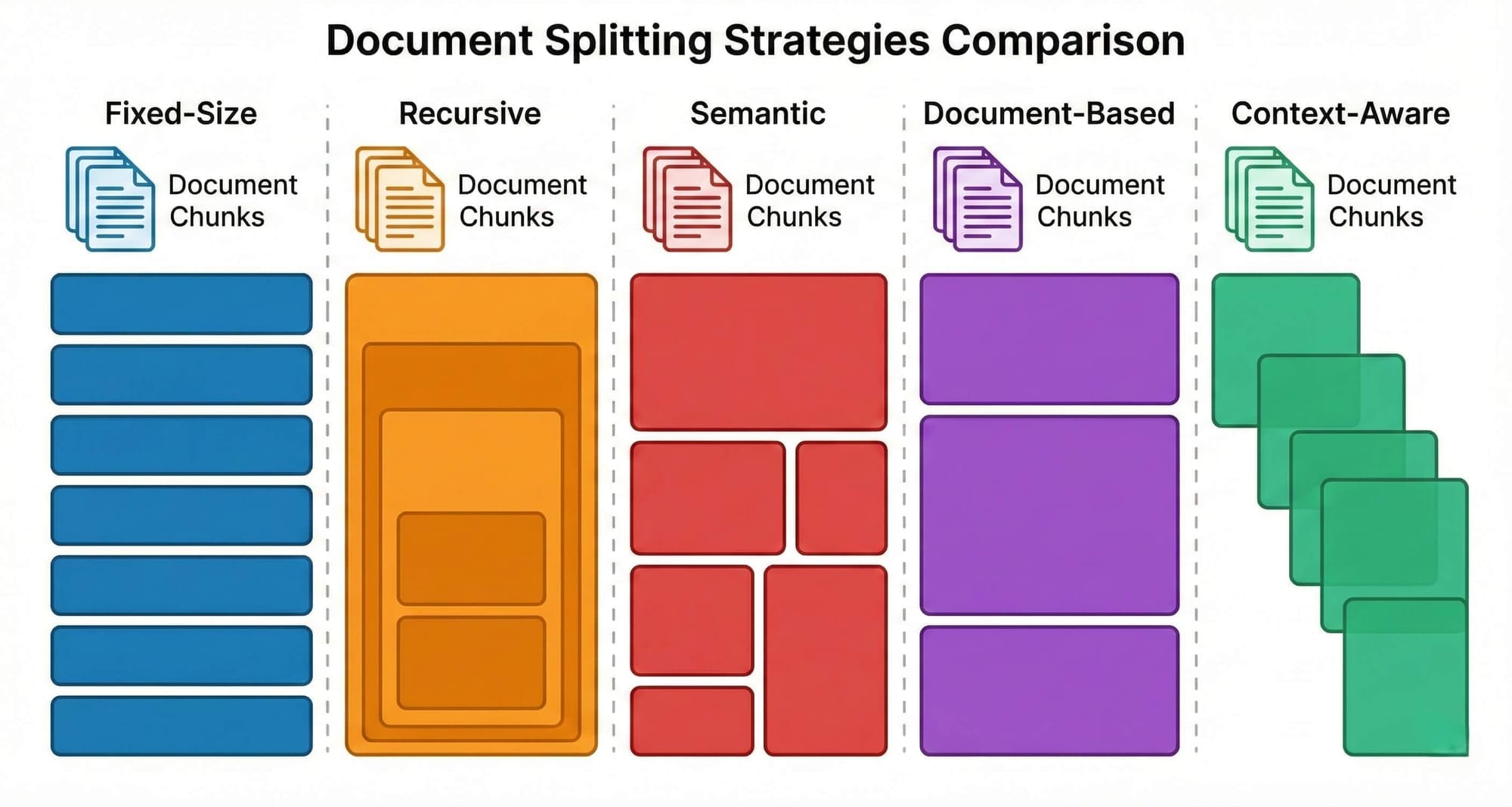
Fixed-Size Chunking splits text every N characters with optional overlap. Dead simple. Completely blind to content — it will split mid-sentence without hesitation. Use it as a quick baseline, but know you can do better.
Recursive Character Splitting tries natural boundaries first, paragraph breaks, then sentences, then words. Respects formatting but not meaning. Two unrelated short paragraphs still end up in the same chunk. A solid default for general-purpose text.
Semantic Chunking splits based on meaning, embedding each sentence and creating boundaries where topic similarity drops. Produces topically coherent chunks, but slower (requires embedding during chunking) and the threshold needs tuning.
Document-Based Chunking uses the document's own structure — headings, sections, page breaks. Works well for structured documents but fails on poorly formatted ones. Section sizes can vary wildly.
Token-Based Chunking counts tokens instead of characters, matching the actual limits of embedding models. Important because a 512-token limit doesn't map neatly to character count. Precise, but semantically blind like fixed-size.
Context-Aware Hybrid Chunking combines structure, token limits, and semantic boundaries. The Docling HybridChunker is a strong example, it respects section boundaries, merges small adjacent chunks, and attaches heading hierarchy as context. Fast, free (no LLM calls), and structure-preserving. This should be your default for any serious RAG system.
Agentic Chunking has an LLM read the document and decide where to split it. Produces the most semantically coherent chunks possible, but it's expensive (LLM calls per document), slow, and non-deterministic. Reserve this for high-value collections where accuracy justifies the cost.
Overlap and Size
Most strategies support overlap — shared text between consecutive chunks. Start with 10-20% of chunk size (e.g., 100-200 characters for 1,000-character chunks). This preserves context at boundaries without excessive redundancy.
For chunk size, start with 500-800 tokens. Too vague in retrieval? Try smaller. Missing context? Try larger. Match the size to your embedding model's limits, a 512-token model can't process a 1,000-token chunk without silent truncation.
RAG System FAQ: Embeddings, Vector Databases, and Chunking
Do I need a dedicated vector database, or is pgvector enough?
For most applications, pgvector is sufficient and significantly simpler. Modern pgvector with HNSW indexing handles millions of vectors comfortably. Switch to a dedicated solution only when your search latency tells you to.
Can I change my embedding model later?
You can, but you'll need to re-embed every chunk in your knowledge base. This is why model selection matters upfront — switching models means reprocessing your entire document collection.
What's the best chunking strategy?
Context-aware hybrid chunking is the best general default — fast, free, and structure-preserving. But "best" depends on your documents. Highly structured technical docs benefit from document-based chunking. Dense research papers might justify semantic or agentic chunking.
How do I know if my chunks are good?
Test with real queries. If your system retrieves irrelevant chunks, your splitting is probably too coarse or semantically incoherent. If it retrieves fragments that lack context, your chunks are too small. Good chunks are self-contained and topically focused.
Should I use open-source or commercial embedding models?
If data privacy is a priority, open-source models (sentence-transformers) keep everything on your infrastructure. If you want maximum accuracy with minimal effort, commercial options (OpenAI, Cohere) perform well. The choice is about control vs. convenience.
The Foundation Is Set — Now Let's Build on It
Embeddings, vector databases, and chunking are the three pillars that everything in a RAG system stands on. They're not the exciting part — nobody writes blog posts titled "I chose pgvector and used 512-token chunks." But they're the part that determines whether your system actually works.
Here's the honest truth: most RAG failures I've seen aren't failures of the LLM or the retrieval strategy. They're failures of the foundation. Bad chunks produce bad embeddings. Bad embeddings produce bad search results. Bad search results produce hallucinated answers. The chain only works when every link is solid.
Now that you understand the foundation, you're ready for the part where things get genuinely interesting. In Part 3, I'll walk you through 11 advanced RAG strategies — from re-ranking and multi-query retrieval to agentic RAG, knowledge graphs, and self-reflective systems. Each one solves a specific problem, and knowing when to use them (and how to combine them) is what separates a demo from a production system that actually delivers.
The foundation is set. Let's build something real on top of it.
P.S. If you haven't read it yet, start with Part 1: What Is RAG and Why Your LLM Needs It for the complete overview of how RAG works. Then continue to Part 3 for the 11 strategies that take your RAG system from basic to production-grade. Read The Part 1
Don't miss out on future posts and exclusive content—subscribe to my free newsletter today.
Ready to connect or explore more? Head over to my LinkedIn profile