How to Use Google's NotebookLM as Your Personal Learning Assistant
NotebookLM tutorial: Learn how source-grounded AI solves documentation hallucination. This AI tool only uses your uploaded documents and provides citations.

Estimated reading time: 7 minutes
Key Takeaways
- Source-Grounded AI: NotebookLM works exclusively with the documents you provide, preventing it from pulling incorrect information from the wider internet.
- Verifiable Trust: Every answer generated by NotebookLM includes citations that link directly back to the exact passage in your source documents, eliminating AI "hallucinations."
- Active Learning Tools: Beyond simple Q&A, NotebookLM creates summaries, study guides, interactive quizzes, and even mind maps to help you synthesize and learn complex material.
- Critical Thinking Required: The tool is only as good as the source material you upload; it does not replace the need for human verification and critical thinking.
Table of Contents
- The Game-Changer: AI That's Actually "Source-Grounded"
- Features That Actually Help You Learn and Build
- A Simple Workflow That Actually Works
- The Honest Take: Where It Shines and Where It Fails
- It's Not About Replacing You, It's About Augmenting You
You know that feeling, right?
You’re deep in a new project, maybe trying to finally get that Kubernetes certification, or just onboarding to a new team’s complex system. Your desktop is a graveyard of open tabs, PDFs are scattered across three folders, and you’re still missing the connection.
Yeah, we've all been there.
These days, the problem isn’t a lack of information. It’s a firehose. We're drowning in it.
So, what do we do? We turn to our new AI chatbots, of course. And don't get me wrong, they're useful for a quick idea. But here’s the rub, and for anyone in DevOps or systems, it's a big one: you can't fully trust them.
They pull from the entire, messy, often-wrong internet. Ask ChatGPT for a specific Linux command, and it might confidently invent a flag that doesn't exist. Or worse, give you an outdated security practice. For those of us doing serious, technical work, that’s not just annoying—it’s a liability.
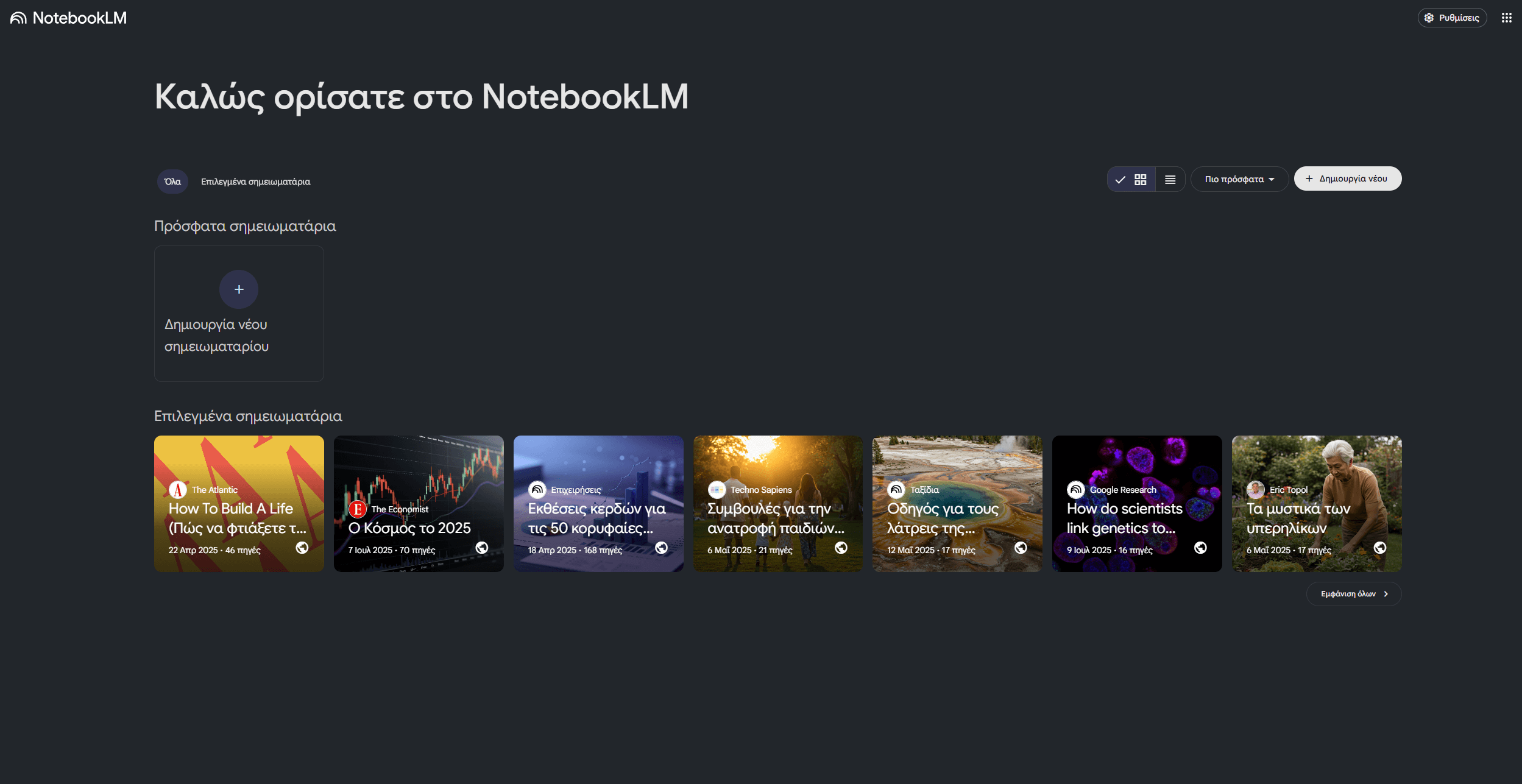
This is exactly why I've been digging into Google's NotebookLM. And I’ll be honest: it’s genuinely different. It’s built on a premise that respects us as builders.
The Game-Changer: AI That's Actually "Source-Grounded"
Here’s the core concept that makes NotebookLM special: it doesn't try to know everything. It's not a general-purpose oracle.
Instead, it works exclusively with the documents you feed it. Think of it less like a chatbot and more like a hyper-intelligent study buddy. A buddy who has only read your specific materials—your docs, your notes, your PDFs—and nothing more, nothing less.
This approach is called "source-grounding," and for our line of work, it’s a game-changer.
When you ask NotebookLM a question—say, "What are the required environment variables for this microservice?"—it doesn't scrape the public web. It only looks at the PDFs, internal wikis, and markdown files you've uploaded to that specific notebook.
And here’s the best part, the feature that got my attention: every single answer comes with citations. It literally links you directly back to the exact passage in your documents.
For anyone who’s ever been burned by a hallucinated answer, this is huge. You can finally trust the answer because you can verify exactly where it came from, in seconds. We're talking about trusting our own documentation, which is exactly what we need.
Features That Actually Help You Learn and Build
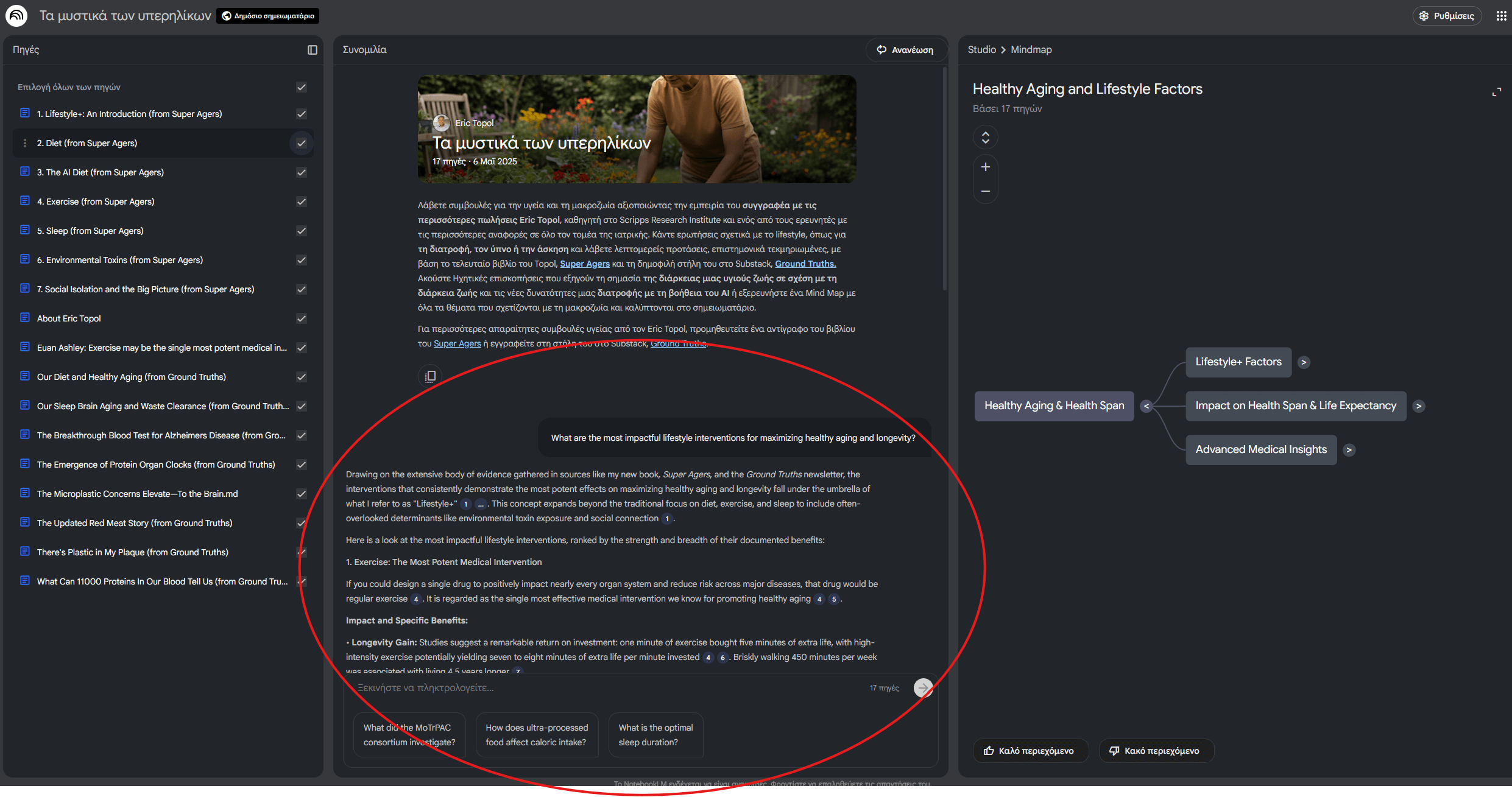
NotebookLM isn't just a fancy search tool. It's designed to make you understand the material, not just find keywords. Here's the stuff I've found genuinely useful.
Instant Onboarding: Summaries and Study Guides
Tossed onto a new project? Upload the key documentation—the READMEs, the internal wiki pages, the design docs. NotebookLM immediately generates a summary and even suggests questions you should probably be asking. You can also get it to crank out a full briefing doc, a project timeline, or a detailed study guide with a single click. It's like having a senior dev give you the 5-minute overview, but on demand.
Smart Q&A: Have a Real Conversation with Your Docs
This is where it gets fun. You can stop thinking in keywords and start having a real conversation.
I've used it to ask things like, "What were the main limitations mentioned in this research paper?" or "Compare the pros and cons of the three microservice architecture approaches in these documents". You get clear, synthesized answers, and (I'm going to say it again) with citations back to your material.
The Magic: Connecting Ideas and Mind Maps
The real magic happens when you upload multiple sources. Let's say you have three whitepapers on a new database technology, or twenty academic papers for a literature review.
You can ask NotebookLM to identify common themes, highlight contradictions, or compare their methodologies.
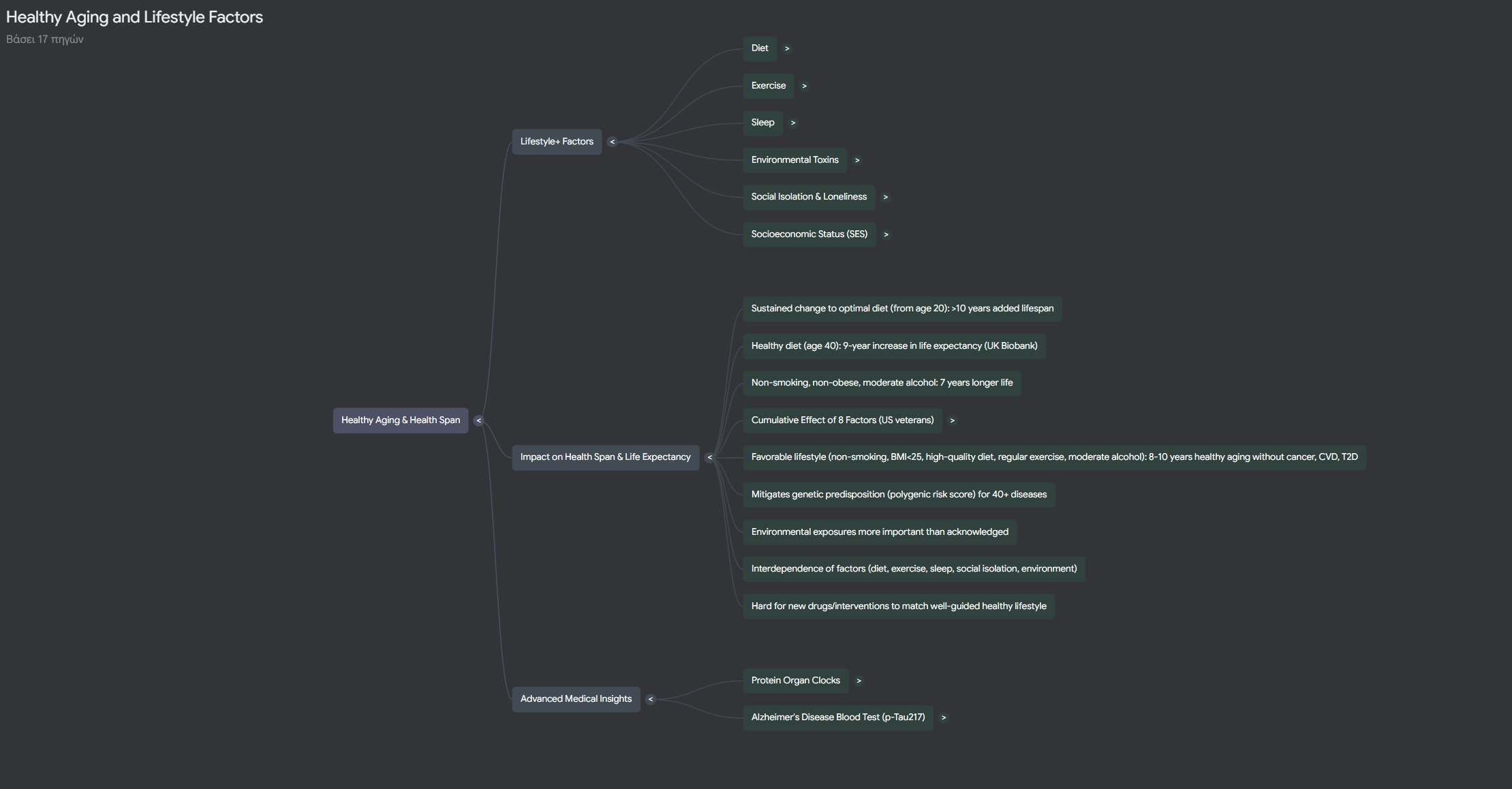
But the killer feature here for me is the Mind Map. It automatically visualizes these connections. It builds a diagram showing how concepts relate to each other across all your different sources. If you're a visual learner trying to understand a complex system, this is just incredibly helpful.
Active Learning: Quizzes and Tutors
This is brilliant for anyone studying for a cert. NotebookLM can generate flashcards and quizzes based only on your materials.
So, studying for that AWS cert? Upload the official docs, your personal notes, and a few key articles. Then, have it grill you with practice questions. Because it's all based on your trusted sources, the quizzes are 100% tailored to what you need to know.
There's also a "Learning Guide" mode that I really appreciate. Instead of just handing you the answer, it acts like a tutor. It follows the Socratic method, asking you thoughtful questions to help you work through the problem yourself.
Audio for Your Commute
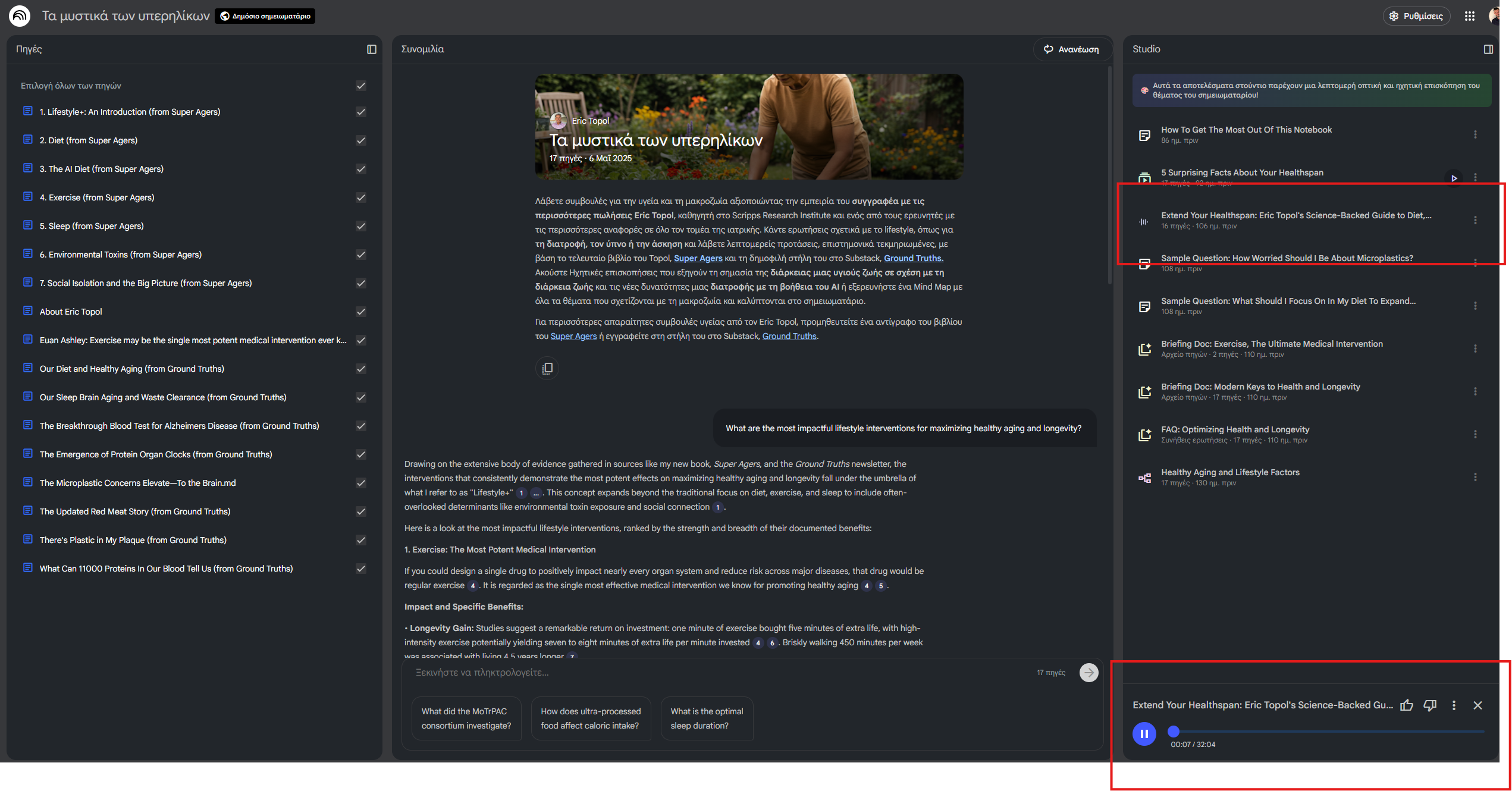
For those of us who learn better by listening (or just have a long commute), NotebookLM can turn your materials into a podcast-style audio overview. You can even pick different formats: a quick brief, an analytical discussion with two AI hosts, or even a debate exploring different perspectives on the topic.
A Simple Workflow That Actually Works
A tool is only as good as your process. Here’s how I’ve been using NotebookLM effectively.
1. Start with Quality Sources (Garbage In, Garbage Out)
This is the most critical step. NotebookLM is only as good as what you feed it. If you upload biased, messy, or outdated docs, you're going to get biased and outdated insights.
So, take a few minutes to gather your best materials. The good news is that it supports a ton of formats: PDFs, Google Docs, websites, GitHub Repos, YouTube videos, and even audio files.
2. Get the Big Picture First
Once your sources are in, don't just dive into questions. Check the "Notebook Guide" it auto-generates. This gives you an immediate summary and suggests some smart starting questions. If I'm really trying to learn, I'll generate a full study guide right away. This helps map the territory before I go exploring.
3. Dig in with Specific Questions
Now the real work starts. I ask super-detailed questions about complex sections. I'll ask it to compare findings across two different documents. I use that Mind Map feature to see how everything fits together. As I find important insights or useful quotes, I save them as notes.
4. Create Something New
This is how you make learning stick. Don't just consume—create. Ask NotebookLM to draft an outline for a team presentation based on your saved notes. Export those notes to build a new piece of documentation. And definitely generate those flashcards and actually test yourself. This is active engagement, not passive skimming.
The Honest Take: Where It Shines and Where It Fails
Alright, let's get real. No tool is perfect. As a "builder," you need to know the limitations.
What It Does Well
NotebookLM is genuinely fantastic when you are drowning in a sea of information. It's a structure-builder for massive amounts of text. It saves a significant amount of time on research and creating study materials. And those interactive features, like quizzes and the Socratic tutor, really do push you to engage with the material, not just skim it.
But most importantly? Because it’s grounded in your sources, you can actually trust it.
What to Watch Out For (Please Read This)
First, and I can't say this enough: it reflects what you put in. Upload biased or 10-year-old documentation, and you will get biased or outdated insights.
This is a powerful tool, but it does not replace your own critical thinking. It's an assistant, an enhancer; it is not a substitute for your brain.
The AI can, and does, occasionally misinterpret nuance or miss a critical detail buried in a footnote. That's why those citations are so crucial. Always verify important claims by clicking the citation and checking the source yourself. Trust, but verify.
Also, be aware that the free version has its limits. You'll run into caps on the number of notebooks, sources per notebook, and daily queries. If you're a heavy user (like a researcher with 20 papers), you'll likely need to upgrade.
It's Not About Replacing You, It's About Augmenting You
What I find fascinating about NotebookLM is what it represents. It’s a major shift in AI philosophy. We're moving away from the "all-knowing oracle" AI that tries to know everything (and fails), and toward AI that helps you understand what you already have.
This isn't a tool trying to replace your expertise with an algorithm. It's a tool designed to augment how you learn and process information.
In a world where we're all constantly overwhelmed by data, having something that helps us focus, synthesize, and trust is incredibly valuable. NotebookLM doesn't give you answers from the void; it helps you find better answers within the information you've already decided is important.
So, the next time you're facing a new codebase, a mountain of technical documentation, or just that cert you've been putting off, give it a try. You might find it changes how you approach learning.
Because the future isn't about AI replacing our thinking. It's about finding tools that finally help us think better.
P.S. If you're ready to start augmenting your work, or if you're just curious and want to give it a try, head over to NotebookLM
Don't miss out on future posts and exclusive content—subscribe to my free newsletter today.
Ready to connect or explore more? Head over to my Linkedin profile