What MCP Actually Is: Architecture, Primitives, and Why It Exists (Part 1 of 2)
Large language models are brilliant but isolated. The Model Context Protocol (MCP) fixes this by standardizing AI integrations. Just as LSP did for IDEs, MCP lets you write a server once using three primitives, Tools, Resources, and Prompts, so any compliant AI assistant can seamlessly use your
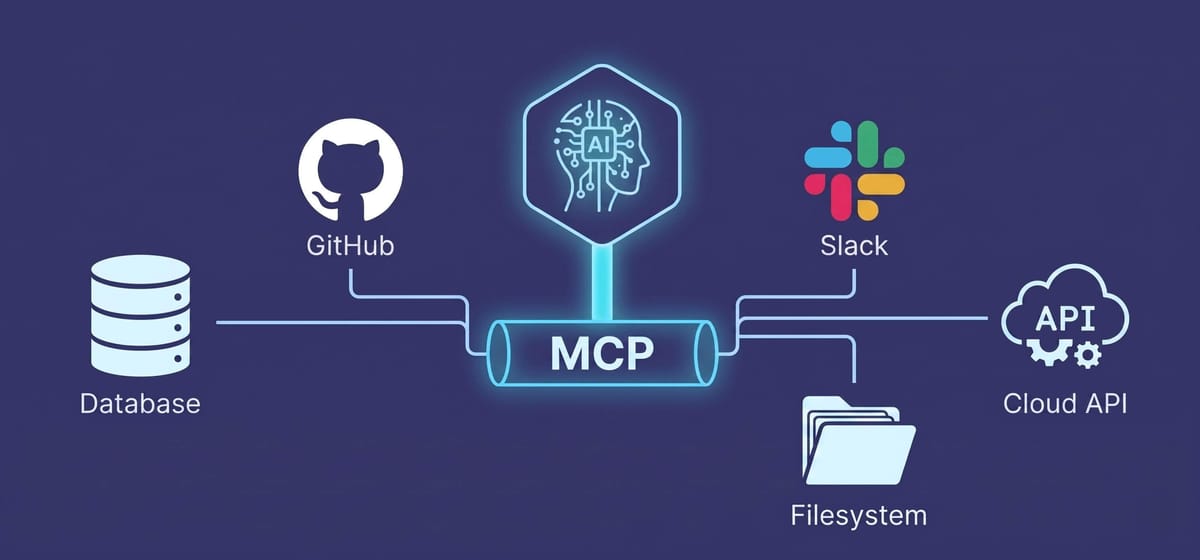
The Model Context Protocol (MCP) is an open standard that lets any AI assistant talk to any data source through one protocol instead of custom adapters. Anthropic open-sourced it in November 2024. Three roles: a host runs the model, a client speaks the protocol, and a server exposes tools, resources, and prompts over JSON-RPC 2.0.
A first-principles guide to the Model Context Protocol — what it solves, how it's wired, and what every server actually exposes.
Estimated reading time: 7 minutes
Key Takeaways
- MCP solves the N×M integration problem. Every AI assistant used to need custom adapters for every data source. MCP standardizes that into one protocol — write the server once, use it with any compliant client.
- The architecture is a clean three-role split. A host runs the LLM, a client speaks the protocol, and a server exposes capabilities. They talk JSON-RPC 2.0 over either stdio (local) or HTTP/SSE (remote).
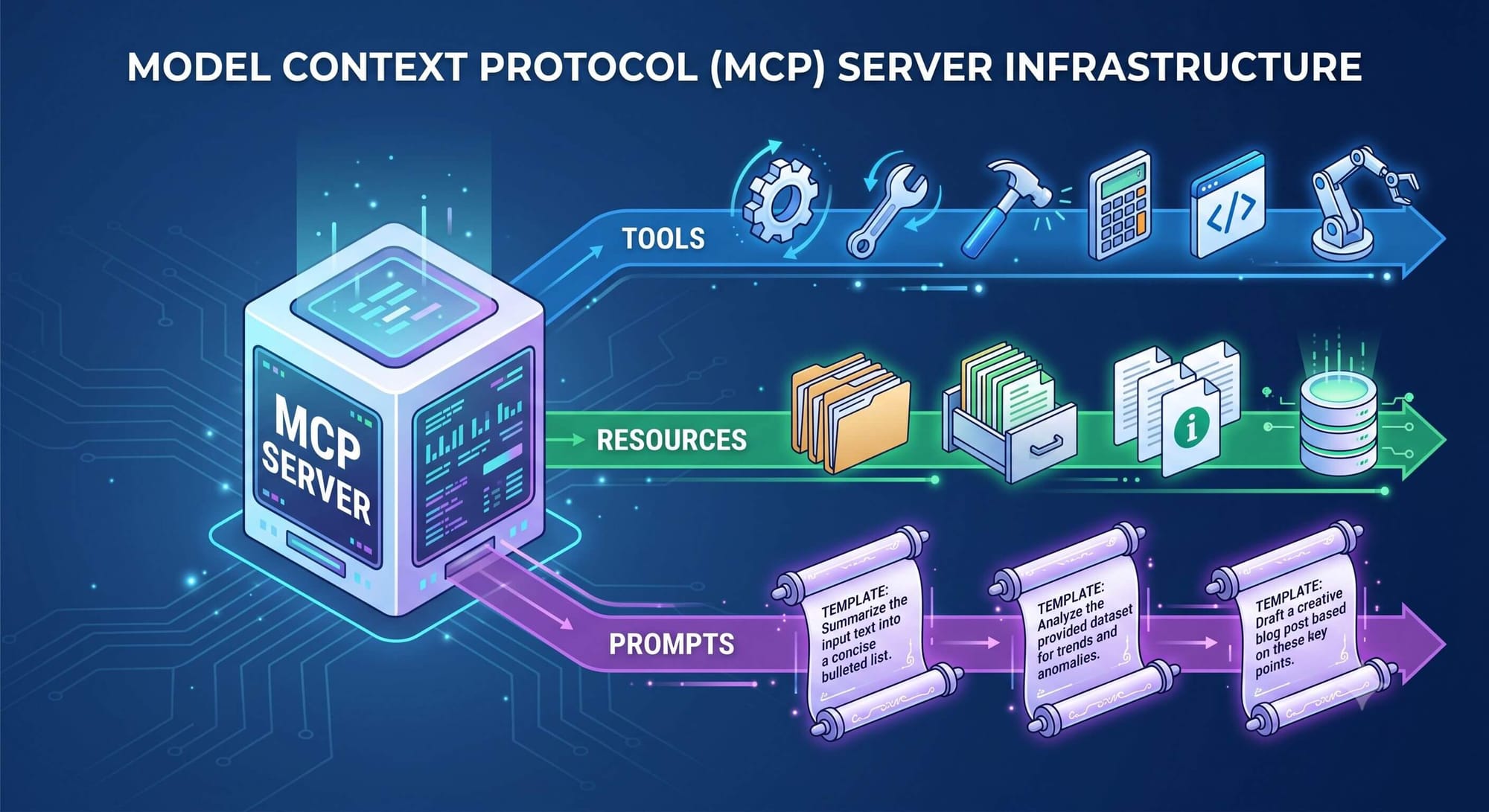
- Servers expose three primitives: tools, resources, and prompts. Tools are actions, resources are data, prompts are reusable templates. The LLM decides when to call them based on the descriptions you write.
- Schemas are the contract. JSON Schema validates input at the boundary, in Python via type hints (FastMCP) or in TypeScript via Zod. The model reads those schemas. Get them wrong and the model gets it wrong.
Table of Contents
- The Integration Mess MCP Was Built to Fix
- The Architecture: Host, Client, and Server
- Tools, Resources, and Prompts: What Servers Actually Expose
- The Foundation Beneath the Hype
How many AI integrations have you written in the last year? Probably a few. Now ask yourself, how many of them looked structurally identical to one you wrote six months earlier?
Different API. Different schema. Different auth flow. But underneath, the same shape: a custom adapter wrapping a third-party service, a JSON contract glued to a model's function-calling format, and a brittle pile of error handling you'll be maintaining forever.
That's the integration tax every team building AI agents was quietly paying. It scales badly. The Model Context Protocol (MCP) was Anthropic's answer to that mess, open-sourced in November 2024. By early 2026, the official SDKs were being downloaded tens of millions of times per month with tens of thousands of community-built servers in the wild. Block and Apollo adopted it early. Cursor, Replit, Zed, and Sourcegraph built it into their tooling.
This first part covers what MCP actually is from first principles, the problem it solves, the architecture, and the three primitives every server exposes. Part 2 covers what breaks when you run it in production. Let's start with the why.
The Integration Mess MCP Was Built to Fix
Here's the fundamental issue: large language models are isolated reasoning engines. On their own, they can analyze text and synthesize language brilliantly, but they have no idea what's in your database, your file system, your Jira backlog, or your ticket queue. To do anything useful, they need to be plugged in.
For the first five years of LLM deployment, that plugging-in was bespoke. Every integration was a custom job. Five products consuming the same Slack data meant five different Slack adapters, each owned by a different team, each broken in slightly different ways.
If you've ever worked in IDE tooling, this should sound familiar. Before the Language Server Protocol existed, supporting a new programming language across ten editors meant writing ten implementations. LSP changed that. The editor became a generic client. The language intelligence became a server. One implementation per language, one per editor, and the cross-product worked.
MCP does the same thing for AI agents. The model becomes a generic consumer. Your data and tools become servers. Write the server once, and every MCP-compliant client gets access without custom code.
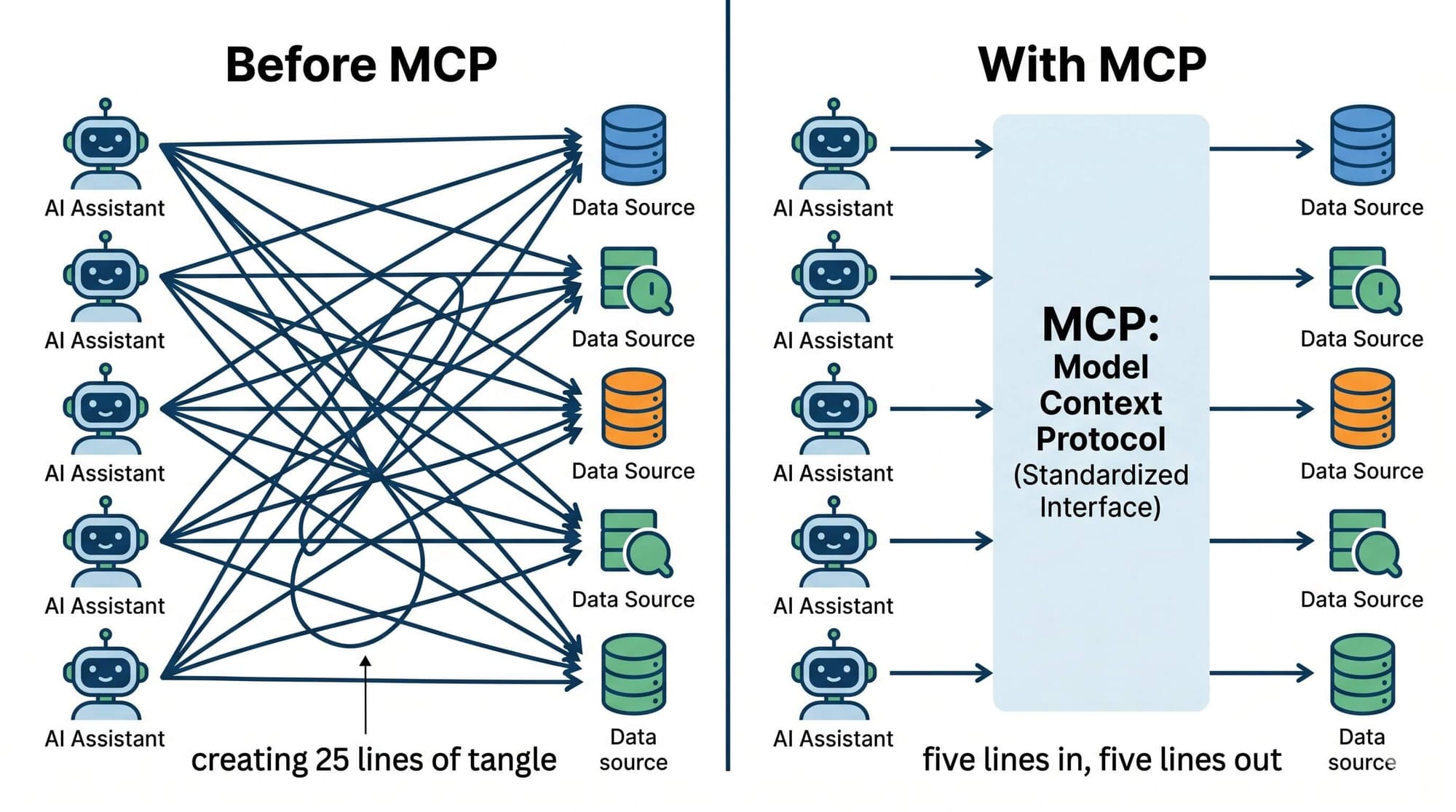
That single architectural shift is why adoption moved as fast as it did. The economics flipped: instead of every team rebuilding the same integrations, one team writes the GitHub MCP server, and every AI assistant in the ecosystem can use it.
The Architecture: Host, Client, and Server
MCP separates concerns into three distinct roles. Most of the security and scaling decisions live exactly on those boundaries.
The host is the application you're actually using Claude Desktop, Cursor, Windsurf, a custom chatbot. It owns the user interface, the conversation state, and the connection to the LLM.
The client lives inside the host. It's the code that speaks MCP. It maintains connections to one or more servers, discovers what each can do, routes tool calls from the LLM to the right server, and streams results back. You usually don't see it, it's an implementation detail.
The server is what you write. A standalone process, running locally or remotely, that exposes capabilities through the MCP protocol. The server holds credentials, runs the business logic, and talks to whatever backend system you're wrapping.
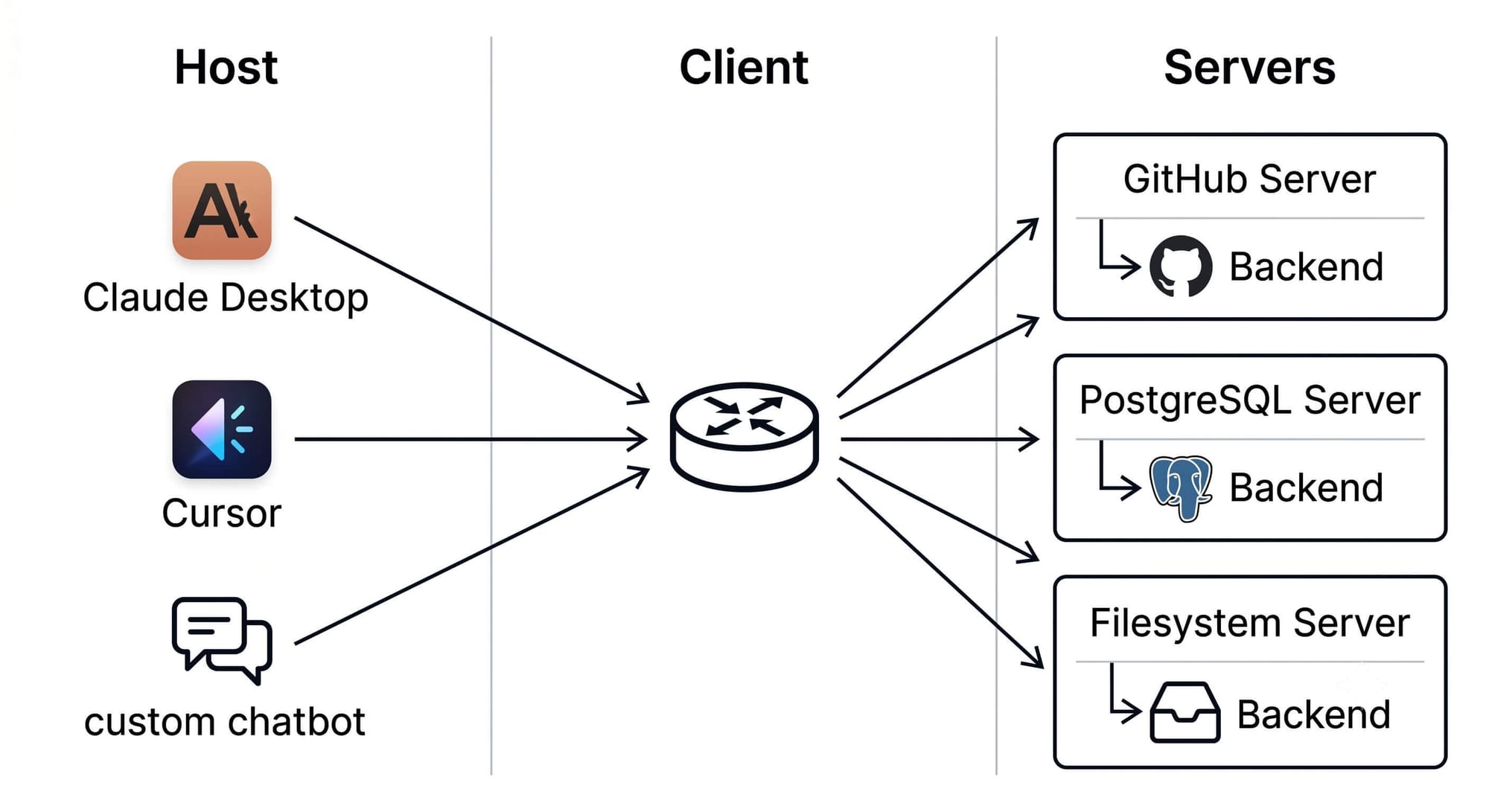
Communication uses JSON-RPC 2.0 over a transport layer. There are two transports in practice:
Standard I/O (stdio) for local servers. The host launches the server as a subprocess and communicates over stdin/stdout pipes. No network exposure, no open ports. This is what you use for filesystem tools, local development utilities, anything that needs to touch your machine directly.
Streamable HTTP / SSE for remote servers. The server runs somewhere else, your cloud, a third-party service, a shared corporate gateway, and the client connects over HTTP with server-sent events for streaming. This is the production deployment story: TLS, auth tokens, network policy, the works.
Here's the thing about agency in this architecture. The developer builds the server and writes the tool descriptions. But the LLM inside the host decides when and how to call those tools. You don't program the orchestration — you describe the capabilities and let the model reason about which one fits. That sounds elegant, and it is. It's also where most of the failure modes live, which Part 2 gets into.
Tools, Resources, and Prompts: What Servers Actually Expose
An MCP server isn't a monolith. It exposes capabilities through three distinct primitives, and mixing them up is one of the most common mistakes I see in early implementations.
Tools are the action layer. Functionally analogous to POST, PUT, or DELETE in REST — they do something. Create an issue. Run a query. Send an email. Each tool has a name, a description, an inputSchema in JSON Schema, and optionally an outputSchema. The LLM reads the description, decides whether the tool fits the user's request, and generates a JSON payload matching the schema.
Resources are the data layer. Closer to GET requests. A resource is an addressable piece of data, a file, a database row, a config object, identified by a URI like file:///app/logs, postgres://db/schema, or greeting://{name}. Resources let the model read structured, permissioned context without invoking a full tool call. They're essentially a protocol-native form of RAG, but for governed, structured data rather than unstructured documents.
Prompts are reusable templates the server provides to the host. They let the domain expert who wrote the server bake in the right system prompt and few-shot examples — so the end user doesn't have to. If you're exposing a code review tool, the prompt template might encode your team's review standards.
Most engineers build tools first and ignore the other two for a while. That's fine — tools are the immediate productive surface. But the moment you start building rich IDE integrations or multi-step domain workflows, resources and prompts stop being optional. They're how you give the model the context it needs to use tools correctly, instead of just guessing.
One more thing worth saying explicitly: schemas matter. JSON Schema is what stands between a hallucinated tool call and a runtime crash. In TypeScript, the convention is Zod for runtime validation, because static TypeScript types vanish at compile time and offer zero protection against a probabilistic model generating malformed JSON. In Python, FastMCP infers schemas from type hints and docstrings. The schema is the contract. The contract is what the model reads. Get it wrong and the model gets it wrong.
Frequently Asked Questions
Do I need to use Anthropic's models to build an MCP server?
No. MCP is vendor-agnostic by design. The same server works with Claude, GPT, a locally hosted Llama, or any other model whose host implements the MCP client side. That portability is one of the protocol's biggest selling points — you're not locked into the company that created the standard.
Can I write an MCP server in any language?
Officially supported Tier 1 SDKs cover Python, TypeScript, C#, and Go. Tier 2 includes Java and Rust. Tier 3 is community-driven implementations in languages like Swift, Ruby, and PHP. Underneath, the protocol is JSON-RPC 2.0 over a transport stream, so you can implement it from scratch in any language that handles that.
What's the difference between stdio and HTTP/SSE transport?
Stdio is for local servers launched as subprocesses by the host — no network, no open ports, full access to your local environment. HTTP/SSE is for remote servers reachable over a network, with TLS, auth tokens, and proper network policy. Use stdio for local development tools, HTTP/SSE for anything you'd host in production.
Is my data safe when an LLM calls my MCP server?
It depends entirely on your security architecture, the protocol itself doesn't enforce safety. Local stdio servers run with your user's full OS permissions. Remote servers need TLS, OAuth-based auth, and tool-level RBAC enforced by a gateway. Part 2 of this series covers the security surface in detail.
The Foundation Beneath the Hype
MCP is doing for AI agents what LSP did for IDEs, turning a chaotic period of one-off integrations into a standardized substrate. That's why it spread so fast. The economics of "write the server once, reuse everywhere" are hard to argue with once you've felt the integration tax.
But understanding the architecture is only half the picture. The reason most teams hit walls with MCP isn't the protocol itself, it's everything that happens around it once real users show up. Context windows fill faster than expected. Tool descriptions turn out to be load-bearing code. Prompt injection becomes a remote-code-execution risk. The infrastructure decisions you make matter more than the protocol details.
That's what Part 2 covers. If you're going to ship MCP in production, not just demo it, read Part 2: Running MCP in Production — Where Demos Break and How to Harden It next. It's where the interesting engineering lives.
The protocol gets you to the starting line. What you do with it after is what separates a working agent from one that survives contact with real users.
P.S. If you want to read the spec yourself, head over to the official Model Context Protocol documentation
Don't miss out on future posts and exclusive content—subscribe to my free newsletter today.
Ready to connect or explore more? Head over to my LinkedIn profile